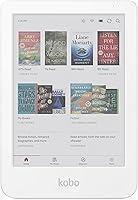
Kobo Libra Colour Review: Is the Color Screen Worth It? (October 2026)
In this Kobo Libra Colour review, the reader is a strong fit if you want a 7-inch color E Ink screen, page-turn buttons, waterproofing and stylus support. Choose a smaller model for easier carrying, or an Android reader for third-party apps.
On this page (10 sections)
- What does the Kobo Libra Colour offer?
- Is the color screen worth it for your reading?
- Are the buttons, size and reading controls useful?
- Is the Kobo Libra Colour good for comics and graphic novels?
- Does waterproofing and battery life make it easier to use?
- How does the Kobo Libra Colour compare with the alternatives?
- How should you set up and care for the Libra Colour?
- What common buying mistakes should you avoid?
- Who should choose the Kobo Libra Colour?
- Which reader should you choose?
In this Kobo Libra Colour review, the Libra Colour stands out for readers who want a 7-inch color E Ink screen, page-turn buttons, waterproofing and stylus support. Color is most useful for comics, graphic novels, illustrations and annotations; if you mainly read novels, a smaller or text-focused reader may suit you better.
The Libra Colour combines a larger screen with 32GB storage, landscape mode, left or right screen rotation and built-in OverDrive borrowing. Kobo Stylus 2 works for notes and highlights, but you need to buy it separately.
What does the Kobo Libra Colour offer?
The Kobo Libra Colour is a color eReader for books, illustrated reading and notes. Physical page-turn buttons, adjustable reading settings and touchscreen controls give you several ways to move through a book.
Kobo Libra Colour: Best for illustrated reading

- 7-inch color E Ink display
- Page-turn buttons
- IPX8 waterproofing
- 32GB storage
- Kobo Stylus 2 compatibility
A color eReader with physical page-turn buttons, waterproofing, 32GB storage and Kobo Stylus 2 compatibility. The stylus is sold separately.
Pros
- Physical page-turn buttons
- Screen rotates left or right
- IPX8 waterproofing
- Supports color notes and highlights with Kobo Stylus 2
- Built-in OverDrive borrowing
Cons
- Stylus sold separately
- Larger than a 6-inch eReader
- Color E Ink is not an LCD screen
Color E Ink makes covers, comics, graphic novels and illustrations easier to distinguish than on a monochrome reader. It is still an eReader screen, not a bright LCD tablet for video or animation, and color images can look less vivid than they do on a phone or tablet.
The Libra Colour also supports a range of content and reading habits. Kobo offers its store, Pocket for saved articles, audiobook support and built-in OverDrive borrowing from a local library.
What makes this Kobo Libra Colour review different?
The strongest reason to consider it is the combination of color E Ink, page-turn buttons and stylus compatibility. Each feature solves a different problem: color helps with illustrated books and marked passages, buttons support physical page turning, and the stylus lets you write or highlight in color.
The screen rotates left or right and supports landscape mode. You can also change font size and margins, so you can adjust the reading layout without choosing another screen size.
Kobo says 32GB can hold up to 24,000 eBooks or 150 Kobo Audiobooks. Those are separate capacity estimates, so the amount you can store depends on the file sizes and mix of content you keep on the reader.
What are the main trade-offs?
The main trade-off is whether you will use color often enough to choose this reader over a simpler one. If your library is mostly novels, the color display and stylus support may not add much to your routine.
The stylus costs extra, and the Libra Colour is larger than the 6-inch Kobo Clara Colour. If compact size matters more than buttons or handwritten notes, compare the Kobo Clara Colour and Libra Colour before choosing.
Is the color screen worth it for your reading?
The color screen is worthwhile if your books or notes use color. It has a clear role for comics, graphic novels, illustrated books, colorful highlights and annotations.
For novels, essays and other mostly text-based reading, a black-and-white screen may cover your needs. Our guide to E Ink versus LCD for reading explains how the screen types differ for book reading.
Color E Ink has a different look from a tablet. The BOOX Go Color 7 Gen II product information describes Kaleido 3 color E Ink as darker or grayer than LCD or LED screens, a useful expectation to keep in mind when considering the Libra Colour’s color display.
Look at the last few books you read and ask how often color would have helped. If you would use illustrations or annotations regularly, the screen has a practical purpose; if not, prioritize the reader’s size, buttons and library features instead.
Are the buttons, size and reading controls useful?
The Libra Colour’s page-turn buttons, screen rotation and landscape mode help if you prefer physical controls or like to change how you hold a reader. Its 7-inch screen provides more room than the Clara Colour’s 6-inch display, while the Clara takes up less space.
Buttons are useful when you want to hold the reader by its side grip and turn pages without tapping the screen. The screen can rotate left or right, so you can position the controls for either hand.
Adjust font size and margins to change how text fits the page, or switch between portrait and landscape mode. These settings can make a book easier to read without changing devices.
If physical controls are a priority, our guide to eReaders with page-turn buttons compares other options. For a broader overview of formats and screens, read Ereaders Explained.
Is the Kobo Libra Colour good for comics and graphic novels?
The Libra Colour is a good fit for illustrated reading because it can display comics, graphic novels, book covers and illustrations in color. Its 7-inch screen gives those pages more room than the Clara Colour’s smaller display.
Page shape and text size still affect comfort. You may need to zoom or use landscape mode for a full comic page, depending on its layout and your preferred reading style.
The reader supports formats including CBR, CBZ, EPUB, EPUB3 and PDF. That gives you several ways to read illustrated files you already have access to.
See our guide to the best eReaders for manga and comics if illustrated reading is your main reason to buy. If general book reading matters more than color, the best E Ink readers for everyday reading cover a broader range of needs.
Does waterproofing and battery life make it easier to use?
The Libra Colour has IPX8 waterproofing, described as protection for up to 60 minutes in up to 2 meters of water. Keep water care practical: dry the reader fully before charging, and avoid assuming that a cover or other accessory adds extra protection.
Kobo gives an average battery life of 4 weeks. Your time between charges will vary with how you use the reader, so treat that figure as a guide rather than a fixed interval.
The Libra Colour connects through Wi-Fi and Bluetooth. Kobo also offers a 30-day Kobo Plus trial, the Kobo Store, Pocket for saved articles, audiobook support and OverDrive borrowing from a local library.
These options can make it easier to keep books, saved articles and library loans together. If you already own Kindle books, read whether Kindle books work on Kobo before choosing based on your existing library.
How does the Kobo Libra Colour compare with the alternatives?
The Libra Colour is the strongest fit here for Kobo readers who want buttons and stylus support. The alternatives make more sense for a compact size, Kindle Store access or Android app flexibility.
| Reader | Screen | Storage | Useful distinction |
|---|---|---|---|
| Kobo Libra Colour | 7-inch color E Ink | 32GB | Page-turn buttons, stylus compatibility, IPX8 |
| Kindle Colorsoft 16GB | 7-inch color display | 16GB | Kindle Store access, color highlights, Dark Mode |
| Kobo Clara Colour | 6-inch color E Ink | 16GB | Compact Kobo reader, color highlights, IPX8 |
| Boox Go Color 7 Gen II | 7-inch Kaleido 3 color E Ink | 64GB plus microSD | Android 13, third-party apps, page-turn buttons |
Kobo Libra Colour vs Kobo Clara Colour
Choose the Libra Colour for its larger screen, buttons, more storage and stylus compatibility. The Clara Colour is the compact choice, with a 6-inch screen and 16GB storage.
Both Kobo readers have color E Ink and IPX8 waterproofing. Clara Colour supports color highlights, while Libra Colour also supports annotation and note-taking with the separate Kobo Stylus 2.
Kobo Libra Colour vs Kindle Colorsoft
Choose the Kindle Colorsoft if Kindle Store access is your main priority. It has a 7-inch color display, highlights in four colors, adjustable white-to-amber lighting and Dark Mode.
Choose the Libra Colour if Kobo’s reading options, OverDrive borrowing, physical page-turn buttons or stylus compatibility better fit your habits. If you are considering an Android alternative too, see our Kobo vs Boox comparison.
Kobo Libra Colour vs Boox Go Color 7 Gen II
Choose the Boox Go Color 7 Gen II if Android and third-party apps matter most. It has Android 13, 64GB storage, a microSD card slot and page-turn buttons; its active stylus is not included.
The Libra Colour suits someone who wants Kobo’s store and built-in library borrowing without the added app options of an Android reader. BOOX states that the Go Color 7 Gen II screen has 300 dpi resolution in black and white and 150 dpi in color.
How should you set up and care for the Libra Colour?
Start by connecting the Libra Colour to Wi-Fi and choosing your reading preferences. Set the font size and margins, test portrait and landscape mode, and rotate the screen to place the page-turn buttons on your preferred side.
If you plan to annotate books, check that Kobo Stylus 2 is part of your budget and set aside time to learn its writing and highlighting controls. For comics and graphic novels, open a few representative pages and adjust zoom or orientation before settling into a long reading session.
Use the device’s waterproofing as extra flexibility, not a reason to handle it carelessly around water. Dry it before charging, and avoid assuming that a case changes its water protection.
What common buying mistakes should you avoid?
The most common mistake is paying for color when your reading rarely uses it. Choose the Libra Colour when illustrations, comics or color annotations matter to you, and compare a simpler reader if your books are almost all plain text.
Another mistake is treating stylus support as an included writing tool. Kobo Stylus 2 is sold separately, so add it to your plan if note-taking is a key reason for choosing this model.
Don’t choose by screen size alone. The Clara Colour is smaller and easier to pack, while the Libra Colour adds side buttons and stylus compatibility; the right fit depends on how you hold and use a reader.
Finally, don’t expect color E Ink to look like a phone or tablet screen. If vivid color and fluid video are your priorities, this kind of eReader is the wrong category.
Who should choose the Kobo Libra Colour?
The Libra Colour fits readers who will use color content, physical buttons or stylus notes. Its blend of a 7-inch color display, waterproofing, storage and Kobo reading options suits people who want an illustrated eReader rather than a basic text reader.
Skip it if you mainly read novels, want the smallest device or expect tablet-like color. The 6-inch Kobo Clara Colour is a better match for compact Kobo reading, while BOOX is the better fit for readers who want Android apps.
Which reader should you choose?
Pick the Kobo Libra Colour if comics, color highlights, page-turn buttons and Kobo’s library borrowing match your reading habits. Choose the Clara Colour for a smaller Kobo, Kindle Colorsoft for Kindle Store access, or BOOX Go Color 7 Gen II for Android app support.
For a wider buying framework, use our eReader buying guide to compare size, screen type and library priorities before deciding.
Frequently asked questions
Is the Kobo Libra Colour good for regular books?
Yes. Its 7-inch color E Ink screen, adjustable font size and margins, and physical page-turn buttons all work for regular eBooks.
Color adds value when covers, illustrations or highlights matter, but readers who mainly read plain text may prefer a simpler or smaller reader.
Can you write notes on the Kobo Libra Colour?
Yes. The Libra Colour supports Kobo Stylus 2 for annotating, highlighting and taking notes in color.
The stylus is sold separately, so factor in the accessory if handwritten notes are central to your reading routine.
Is the Kobo Libra Colour waterproof?
It has an IPX8 rating and is described as waterproof for up to 60 minutes in up to 2 meters of water. Keep the charging port and accessories in mind when handling it near water, and dry the device before charging.
How does the Kobo Libra Colour compare with the Kobo Clara Colour?
The Libra Colour has a 7-inch display, 32GB storage, page-turn buttons and Kobo Stylus 2 compatibility. The Clara Colour is smaller at 6 inches, has 16GB storage and supports color highlights.
See our Kobo Clara Colour vs Libra Colour guide for a closer comparison.