7 Best E-Readers With Page-Turn Buttons (October 2026)
The best e-readers with physical page-turn buttons include the Kobo Libra Colour for color reading, the Boox Go Color 7 Gen II for Android flexibility, and the Xteink X4 Pro for a pocket-size lit reader.
On this page (7 sections)
- Which e-reader with buttons fits your reading style?
- What should you compare before choosing page-turn buttons?
- How do you set up an e-reader with buttons?
- What mistakes should you avoid with button e-readers?
- How do you care for a pocket e-reader?
- How we chose these e-readers with buttons
- Which e-reader with buttons should you pick?
The best e-reader with buttons for most readers is the Kobo Libra Colour, with a 7-inch color E Ink screen, physical page-turn buttons and IPX8 waterproofing. For a pocket-size reader, the Xteink X4 Pro adds buttons and a front light; for a 6-inch screen, consider the PocketBook Verse.
Physical controls can make page turns easier when you prefer a press to a swipe, especially while holding a reader in one hand. The picks below range from small 3.7-inch pocket readers to 7-inch models with color or monochrome screens.
If you're still choosing a screen size or device type, start with our guide to e-readers, their screens and formats or the simple way to choose an e-reader. For a broader look at everyday screens, see our best E Ink readers.
Our picks at a glance
-
1

-
2

-
3
Which e-reader with buttons fits your reading style?
The Kobo Libra Colour is the broadest fit here, while the smaller Xteink models prioritize portability and the PocketBook options offer 6- or 7-inch screens with physical controls. Choose by screen size and lighting needs first.
How should you choose an e-reader with buttons?
Choose an e-reader with buttons by matching the screen and controls to where and what you read. Start with how much text you want visible, then check lighting, file access and any features you will use every week.
A page-turn button is most useful when you read one-handed, hold a device while standing, or prefer a clear press over a swipe. Buttons do not make every reader equally comfortable, though: their location, the device's width and the way you hold it still matter.
For long novels, a 6- or 7-inch screen gives lines and font settings more room. Pocket-size screens trade that space for a device you can slip into a pocket and use in short breaks.
Think about your library before choosing a brand or system. If you already have files, check that the reader supports their format and that any digital rights restrictions allow them to open; the Xteink X3, for example, only supports DRM-free EPUB and TXT books.
Light is another practical dividing line. A front light helps when the room is dim, while the X3 has no front light and calls for a well-lit room or an external reading light.
Kobo Libra Colour: Best for color reading
- 7-inch color E Ink screen
- Physical page-turn buttons
- IPX8 waterproofing
- 32 GB storage
A larger color screen, physical page-turn buttons and IPX8 waterproofing make the Libra Colour a flexible choice for novels, comics and reading near water.
Pros
- Color E Ink screen
- Physical page-turn buttons
- IPX8 waterproofing
Cons
- Stylus 2 is sold separately
The Kobo Libra Colour is the strongest all-round pick if you want physical page-turn buttons on a 7-inch color screen. It also supports left and right screen rotation, font size and margin adjustments, and landscape mode.
Color E Ink can suit book covers, comics, graphic novels and illustrations. The 32 GB storage is stated to hold up to 24,000 eBooks or 150 Kobo Audiobooks, and the device is rated IPX8 for up to 60 minutes in up to 2 meters of water.
Kobo says the reader offers weeks of battery life. It also supports Kobo Stylus 2 for marking up eBooks, but the stylus is sold separately.
Choose it if you want buttons, color and water protection in a larger reader. Skip it if a compact screen matters more than room for color pages or if you do not need its waterproofing and stylus features.
For a comparison of immersion ratings and other water-ready choices, see our guide to waterproof e-readers.
Boox Go Color 7 Gen II: Best for Android flexibility
- 7-inch Kaleido 3 color screen
- Physical page-turn buttons
- Android 13
- 64 GB storage
This 7-inch color E Ink tablet has page-turn buttons, Android 13 and support for third-party apps. It also supports active InkSense stylus input, but the stylus is sold separately.
Pros
- Page-turn buttons
- Android 13 and third-party app support
- 64 GB storage
Cons
- Active stylus is not included
- Color E Ink appears darker or grayer than LCD or LED screens
The Boox Go Color 7 Gen II suits readers who want buttons plus an Android device. It runs Android 13 and supports third-party apps, with 64 GB of storage and a microSD card slot.
Its 7-inch Kaleido 3 screen displays 4,096 colors, with stated resolution of 300 ppi in black and white and 150 ppi in color. The physical page-turn buttons are joined by a power button, USB-C port, built-in speaker and microphone.
Color E Ink screens are darker or grayer than LCD or LED screens, as BOOX notes. Its active InkSense stylus is supported but not included, and the device does not support EMR styluses.
Choose it if app flexibility and color are priorities, especially if you want to read across several services. Skip it if you want a simple book-first device or expect a bright LCD-like color screen.
Xteink X4 Pro: Best for a pocket-size lit reader
- 4.3-inch E Ink screen
- Physical page-turn buttons and touchscreen
- Adjustable warm and cool front light
- 72 g
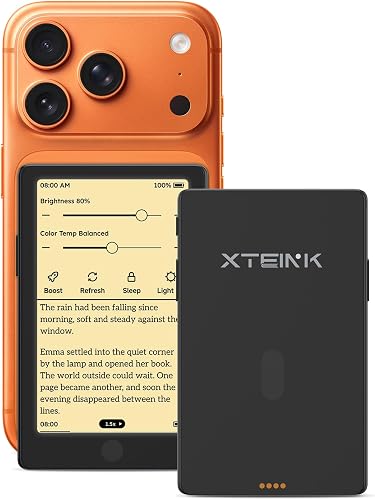
The 4.3-inch X4 Pro combines tactile side buttons with touch controls in a 72 g body. Its adjustable warm and cool front light supports reading in bright sunlight or darkness.
Pros
- Adjustable warm and cool front light
- Physical and touch controls
- Supports microSD cards up to 256 GB
Cons
- Small 4.3-inch screen
The Xteink X4 Pro is the pocket-size choice for readers who still want physical page-turn buttons and a front light. Its 4.3-inch screen fits in a 72 g device, and it also accepts touch and gesture controls.
The adjustable warm and cool front light is useful if your reading moves between bright daylight and darkness. Storage starts at 16 GB, with microSD card support up to 256 GB.
Choose it for compact carry and flexible controls, including reading in dim light. Skip it if a small page feels cramped or you mostly read long sessions where a larger display would reduce frequent page turns.
If a tiny device is your priority, compare the options in our guide to small e-readers that fit a pocket or purse.
Xteink X4 Classic: Best for simple one-handed turns

- 4.3-inch E Ink screen
- Dedicated physical buttons
- Gyroscope page turning
- 68 g
At 68 g, the X4 Classic is a compact reader with dedicated physical buttons and gyroscope-based page turning. Its 4.3-inch screen keeps it easy to carry, though text has less room than on a 6- or 7-inch reader.
Pros
- Dedicated physical buttons
- Gyroscope page turning
- 68 g body
Cons
- Small 4.3-inch screen
The Xteink X4 Classic keeps the pocket format and provides dedicated physical buttons alongside a gyroscope-based shake function for page turns. Its 4.3-inch E Ink screen sits in a 68 g body.
It supports TXT, EPUB, MOBI, PDF and PNG files. The 16 GB storage and magnetic back add practical details for a small reader, while the stated 920 mAh battery supports everyday reading.
Choose it if you want a simple, compact reader and like the idea of either pressing a button or using a shake to turn pages. Skip it if you need a front light, a larger screen or a device suited to detailed PDFs.
Xteink X3: Best for the smallest carry

- 3.7-inch E Ink screen
- Physical buttons and gyroscope page turning
- 58 g
- Up to 256 GB expandable memory
The 3.7-inch X3 is the lightest option here at 58 g, with physical buttons and gyroscope page turning. It has no front light, so plan to read where you have suitable lighting.
Pros
- Smallest screen and lightest body here
- Physical buttons and gyroscope turns
- Expandable memory
Cons
- No front light
The Xteink X3 is the smallest option here, with a 3.7-inch screen and 58 g weight. Physical buttons and gyroscope page turning give you two ways to advance pages without relying on touch alone.
Its 16 GB built-in storage can be expanded with a memory card up to 256 GB. The X3 has no front light, so it suits readers who can use a well-lit room or an external reading light.
The maker says it supports up to 10 hours of reading time. Check format and file restrictions before choosing it: the X3 supports DRM-free EPUB and TXT files.
Choose it if your main goal is a minimal, light device for short reading sessions and compatible books. Skip it if you rely on Kindle or Libby DRM-protected books, need front lighting, or want a screen large enough for comfortable PDFs.
PocketBook Era Lite: Best for a larger monochrome screen

- 7-inch E Ink Carta 1300 screen
- Signature side control buttons
- Adaptive SMARTlight
- Text-to-Speech
The 7-inch Era Lite pairs side control buttons with adaptive SMARTlight and support for 25 formats. Its IPX4 water resistance protects against splashes.
Pros
- 7-inch screen with side controls
- Adaptive SMARTlight
- Text-to-Speech and audiobook support
Cons
- IPX4 protects against splashes, not full immersion
The PocketBook Era Lite gives you a 7-inch monochrome screen with side control buttons. Adaptive SMARTlight lets you choose warmer or cooler tones, and Text-to-Speech can read text aloud.
PocketBook says it supports 25 formats and comes with the Libby app pre-installed. Bluetooth audiobook support and IPX4 splash resistance add options for listening and everyday use.
Choose the Era Lite if you want a large screen with side controls, adjustable light and text read aloud. Skip it if you need protection for immersion: IPX4 is for splashes, while the Kobo Libra Colour has an IPX8 rating.
PocketBook Verse: Best for a 6-inch touch reader with buttons

- 6-inch E Ink Carta touchscreen
- Mechanical control buttons
- Adjustable SMARTlight
- Memory card support up to 128 GB
The 6-inch Verse offers a smaller screen than the Era Lite, with mechanical control buttons, a touchscreen and adjustable SMARTlight. Its memory card slot supports cards up to 128 GB.
Pros
- 6-inch screen with mechanical buttons
- Adjustable SMARTlight
- Memory card support
Cons
- 8 GB built-in storage
The PocketBook Verse offers a 6-inch touchscreen with mechanical control buttons. Its adjustable SMARTlight changes both screen brightness and color temperature, while the 182 g body keeps it lighter than the 7-inch PocketBook Era Lite.
It has 8 GB of built-in memory and supports a memory card up to 128 GB. PocketBook names support for 25 formats, Wi-Fi and its Cloud service.
Choose the Verse if you want buttons, a mid-size screen and adjustable lighting. Skip it if you need more built-in storage or want the extra screen area of the Era Lite.
What should you compare before choosing page-turn buttons?
Screen size, lighting and the kind of controls matter more than the button feature alone. Decide whether you want a reader for pocket carry, longer reading sessions or mixed content such as comics.
Is a small e-reader with buttons right for you?
A small e-reader with buttons is easiest to carry, but it gives text less room on screen. The Xteink X3 has a 3.7-inch display, while the X4 Classic and X4 Pro use 4.3-inch screens.
Pocket-size models suit short reading sessions and travel. If you want more space for text, illustrations or larger font settings, compare our small e-reader picks with the 6- and 7-inch models here.
Do you need a color screen?
Choose color if you read comics, graphic novels or illustrated material and want those images displayed in color. The Kobo Libra Colour and Boox Go Color 7 Gen II both use 7-inch color E Ink screens.
For mostly text, a monochrome screen may be enough. To understand the tradeoffs, read our guide to E Ink screens for everyday reading.
How important is a front light?
A front light matters if you read in dim rooms or at night. The Xteink X4 Pro names adjustable warm and cool front lighting, while the X3 has no front light and is best used in a well-lit space or with an external reading light.
The PocketBook Era Lite and Verse also name adjustable SMARTlight. Compare that feature with the screen and size you want, since lighting alone does not determine whether a reader will suit your routine.
Which physical controls should you look for?
Check whether the device names page-turn buttons specifically, and whether it also offers touch or other controls. The X4 Pro combines side buttons with touch and gestures, while the X4 Classic and X3 pair buttons with gyroscope turns.
The Kobo Libra Colour names page-turn buttons and left/right screen rotation. PocketBook describes side or mechanical controls, so those are options if you prefer a larger reading area.
How do you set up an e-reader with buttons?
Set up an e-reader with buttons by charging it, connecting to Wi-Fi if needed, and loading a book you can open on that device. Then adjust the text and light before you settle into a long session.
Start by checking the included cable or charging method and use the device's setup prompts. The Xteink X3 supports 2.4 GHz Wi-Fi, and its transfer options include Wi-Fi, a device hotspot, MicroSD and the Xteink app.
Before moving a book, confirm its format and any DRM limits. The X3 is especially restrictive, supporting only DRM-free EPUB and TXT books, while the other devices list a broader set of formats or app access.
Once a book opens, set a comfortable font size and margin, then test the page-turn buttons with the hand you usually use. If a device also offers touch, gestures or gyroscope turns, learn how to switch between them before reading while walking or commuting.
For the X3, pick a well-lit spot or keep an external reading light nearby. On color E Ink devices, adjust the front light if the screen looks darker than a phone or tablet display.
What mistakes should you avoid with button e-readers?
The most common buying mistake is choosing by button presence alone. A reader can have excellent physical controls and still be the wrong fit because its screen, lighting, file support or ecosystem misses your needs.
Do not assume every e-reader has the same button layout. Look at whether controls are described as side, mechanical or dedicated page-turn buttons, and consider whether you want touch input as a second option.
Avoid expecting a pocket reader to replace a larger screen for every kind of reading. The X3's 3.7-inch display and the 4.3-inch Xteink screens are made for portability, while 6- and 7-inch models leave more room for text and illustrations.
Check lighting before buying. The X3 has no front light, so it is a poor match for someone who often reads in bed with the room dark.
Finally, do not assume format support means every borrowed or purchased book will open. Confirm DRM and app compatibility for your library before transferring a collection, especially if you depend on books from Kindle or Libby.
How do you care for a pocket e-reader?
Care for a pocket e-reader by protecting its screen from pressure and sharp impacts, and by keeping charging contacts clean. Small devices are easy to carry, but their glass screens still need a little care.
Use a sleeve or case when you place a reader in a bag with keys, chargers or other hard objects. The X4 Classic includes a screen protector and recommends keeping it on; avoid bending or placing heavy pressure on its glass display.
For magnetic models, keep charging contacts clear of dust and debris. The X3 guidance also advises keeping conductive objects away from charging contacts while charging.
If an Xteink device becomes unresponsive, its support instructions recommend pressing RESET and then holding the Power button to restart. If charging is unreliable, inspect and clean the contacts, then try another cable or power adapter.
How we chose these e-readers with buttons
We compared the stated physical controls, screen sizes, lighting, storage and features relevant to reading. Every pick here names physical buttons or mechanical control buttons in its features.
Our score reflects how well each device's stated features fit readers seeking physical page turns. Pocket-size models rank for portability, while the larger choices offer more screen area, color or app flexibility.
Which e-reader with buttons should you pick?
Choose the Kobo Libra Colour if you want a 7-inch color screen, page-turn buttons and IPX8 waterproofing. Pick the Boox Go Color 7 Gen II if Android 13 and third-party apps matter more, or the Xteink X4 Pro if pocket carry and a front light are priorities.
For the smallest option, choose the Xteink X3 and plan for external lighting and DRM-free EPUB or TXT files. If you want a 6-inch screen with physical controls, the PocketBook Verse is the more compact PocketBook choice; choose the Era Lite for a 7-inch monochrome screen and text-to-speech.
If you are weighing other brands and ecosystems, our guide to Kobo versus Boox can help you compare their approaches.
| Product | Best for | Screen | Controls | Water protection | Our score |
|---|---|---|---|---|---|
| Kobo Libra Colour | color reading | 7-inch color E Ink | Page-turn buttons, touchscreen | IPX8, up to 60 minutes in up to 2 meters of water | 8.8 |
| Boox Go Color 7 Gen II | Android flexibility | 7-inch Kaleido 3 color E Ink | Page-turn buttons | 8.0 | |
| Xteink X4 Pro | a pocket-size lit reader | 4.3-inch E Ink | Physical page-turn buttons, touchscreen and gestures | 7.9 | |
| Xteink X4 Classic | simple one-handed turns | 4.3-inch E Ink | Physical buttons and gyroscope page turning | 7.5 | |
| Xteink X3 | the smallest carry | 3.7-inch E Ink | Physical buttons and gyroscope page turning | 7.3 | |
| PocketBook Era Lite | a larger monochrome screen | 7-inch E Ink Carta 1300 | Side control buttons and touchscreen | 7.2 | |
| PocketBook Verse | a 6-inch touch reader with buttons | 6-inch E Ink Carta | Mechanical control buttons and touchscreen | 6.9 |
Our top 3 picks at a glance
-
1
-
2
-
3
Frequently asked questions
What counts as an e-reader with buttons?
An e-reader with buttons has physical controls you press to turn pages or move through the device. These picks include models whose features name page-turn or mechanical control buttons.
A touchscreen alone does not count as a physical button.
Are page-turn buttons useful for one-handed reading?
Yes, physical page-turn buttons can let you advance a page with a press instead of a swipe. The Kobo Libra Colour, Xteink models and PocketBook readers here name buttons among their controls.
Check where the controls sit and how you tend to hold a reader before choosing.
Which button e-reader is easiest to carry?
The Xteink X3 is the lightest pick here at 58 g, with a 3.7-inch screen and physical buttons. The X4 Classic and X4 Pro both have 4.3-inch screens and weigh 68 g and 72 g.
The smaller screens leave less room for text than the 6- and 7-inch options.
Do all e-readers with buttons have a front light?
No. The Xteink X3 has physical buttons but no front light, while the X4 Pro names adjustable warm and cool front lighting.
The Kobo Libra Colour and PocketBook models also name lighting features.
Check the specific model if you often read in dim rooms.


