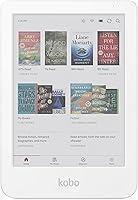
Ereaders Explained: Types, Screens and What to Buy
An ereader is a device made mainly for reading digital books. Most use E Ink screens, while some add color, physical buttons, waterproofing or note-taking features.
On this page (9 sections)
- What is an ereader, and how does it work?
- What kinds of ereaders can you buy?
- Is E Ink better than an LCD screen for reading?
- Which ereader features matter most?
- How do you choose an ereader for your routine?
- How do you choose between Kindle and other ereaders?
- Which ereader should you buy?
- Can an ereader replace a phone or tablet?
- How do you narrow your ereader shortlist?
An ereader is a portable device made mainly for reading digital books. Most use E Ink screens, with options ranging from monochrome readers to color models and larger devices for notes and documents.
The right type depends on what you read, where you read, and whether you want extras such as waterproofing, page-turn buttons or a writing surface. Start with the screen and your reading habits, then check book access and size.
What is an ereader, and how does it work?
An ereader stores and displays digital books on a screen built for reading. Many use E Ink, an electronic ink display that looks different from the LCD screen on a phone or tablet.
Ereaders vary in size, lighting, color support and controls. A reader may focus on text and touch navigation, while other models add warm light, physical buttons, waterproofing or note-taking.
The key distinction is purpose. A phone can run many apps, while a dedicated ereader keeps reading at the center.
The Kindle Paperwhite has no social media, notifications or other distracting apps.
If you're deciding whether a dedicated device suits your habits, see who benefits from an ereader. If you're ready to compare models around your routine, use a simple way to choose an e-reader.
What kinds of ereaders can you buy?
Ereaders fall into a few useful groups: standard monochrome readers, color E Ink readers, compact readers and large reading-and-writing devices. The labels describe the main use, but features can overlap.
| Type | Best fit | What to check |
|---|---|---|
| Standard E Ink reader | Mostly text-based books | Screen size, lighting and book access |
| Color E Ink reader | Comics, illustrations and color notes | Color support, size and preferred book store |
| Compact reader | Pocket carry and short reading sessions | Screen size, buttons and light |
| E Ink notebook reader | Reading, notes and document markup | Writing tools, weight and file handling |
These are starting points, not strict categories. A larger reader can still focus on books, and a small reader may include both touch and physical controls.
Which ereader type fits your books?
A standard E Ink ereader suits mostly text-based reading, while a color model fits books that use illustrations, comics or graphic novels. Choose based on the pages you read most.
The Kobo Libra Colour supports color markups and works with Kobo Stylus 2, sold separately. It also supports comics and graphic novels, while its page-turn buttons and screen rotation offer more ways to hold and navigate it.
If you mostly read plain text, consider whether color will change how you read. If not, prioritize the screen size, lighting and book access that matter every day.
Is a small ereader easier to carry?
A compact ereader is easier to slip into a pocket or bag, but its smaller screen shows less text at once. It can suit commutes and brief breaks if portability matters more than a larger page.
The Xteink X4 Pro combines touch and side page-turn buttons. Its adjustable warm and cool front light supports reading in different lighting conditions.
Think about where you will carry the device and how long you usually read in one sitting. For more pocket-size options, see small e-readers that fit a pocket or purse.
When does a large E Ink reader make sense?
A large E Ink device can suit readers who want to read and write on the same screen. Its larger display provides room for notebooks, documents or handwritten notes.
The Kindle Scribe 32GB combines a front-lit display with a built-in notebook. Its included pen has an eraser and shortcut button, and the device supports handwritten notes on book pages and document markups.
Choose a notebook-focused reader if writing is part of your routine. For mostly reading on the move, a smaller model is easier to carry.
Is E Ink better than an LCD screen for reading?
E Ink suits dedicated book reading, while LCD works for people who also want color-rich apps and media. The better screen depends on whether you want a focused reading device or a general-purpose tablet.
E Ink displays are common on ereaders and can be glare-free, depending on the model. Some include a front light or adjustable warmth for reading in bright or dim settings.
LCD screens are common on phones and tablets. They show color and support many kinds of apps, but that flexibility can bring notifications and other distractions into a reading session.
A screen type alone does not decide comfort for every reader. Compare display size, lighting controls, the kinds of books you read and how you plan to use the device.
For a closer look at the trade-offs, read E Ink vs LCD for reading. If you want to compare an ereader with a general-purpose device, see ereaders vs tablets for books.
Which ereader features matter most?
Screen size, lighting, controls and water protection affect how an ereader fits your reading sessions. Storage, book services and writing tools matter when they match your library or habits.
Screen size and portability
A larger screen shows a broader reading area, while a smaller one is easier to carry. Compare the device dimensions with the bag or pocket you expect to use, and consider how much page space you prefer.
The Kindle Paperwhite and Kobo Libra Colour each have a 7-inch screen. The Xteink X4 Pro has a 4.3-inch screen, while the Kindle Scribe has an 11-inch display.
Front light and warm light
A front light helps illuminate the screen when the room is dim. Some devices let you adjust the color from white toward amber, as the Kindle Paperwhite does.
Check which lighting controls the specific model has. Screen size and light features can vary among readers.
Physical buttons and touch controls
Touch control is common, but some ereaders also include physical page-turn buttons. Buttons offer a tactile way to move through a book without tapping the screen.
The Kobo Libra Colour and Xteink X4 Pro both have physical page-turn buttons. For a broader comparison, see ereaders with page-turn buttons.
Waterproofing
Water protection can matter if you read near a bath, pool or other wet places. Compare the model's stated protection level, and follow its use guidance rather than assuming all ereaders have the same protection.
The Kobo Libra Colour has an IPX8 rating and is waterproof for up to 60 minutes in up to 2 meters of water. The Kindle Paperwhite is described as waterproof.
Storage and book access
Storage tells you how much room a device has for books and other supported content. Book access depends on the store, library service and file types that fit your collection.
The Kobo Libra Colour has 32GB of storage and built-in OverDrive for borrowing ebooks from a local library. The Kindle Paperwhite provides access to Kindle Store titles, and the Xteink X4 Pro supports EPUB, TXT, PDF and MOBI formats.
Before buying, check whether the service you already use works with your preferred device. See whether you can read Kindle books on a Kobo if you're comparing those two ecosystems.
Writing and document tools
Writing tools help readers annotate books, keep a digital notebook or mark up documents. Choose them when you expect to use those features.
The Kobo Libra Colour is compatible with Kobo Stylus 2, sold separately, for annotations, highlights and notes in color. The Kindle Scribe includes a pen and supports notebook writing, book notes and document markups.
How do you choose an ereader for your routine?
Choose the smallest, simplest ereader that supports your books and reading habits. Add features when they solve a clear need, such as reading near water, carrying a device in a pocket or marking up documents.
Use these questions to narrow your options:
- Do you mostly read text, or do you need color for comics and illustrations?
- Will you carry the device in a pocket, a small bag or a larger work bag?
- Do you want physical page-turn buttons, or is touch control enough?
- Will you read near water?
- Do you need to write notes or mark up documents?
- Does the device work with your preferred store, library and book files?
A mostly text reader with lighting and a larger screen may suit long reading sessions. A color model fits illustrated books, and a compact model favors portability.
A writing-focused E Ink device suits readers who regularly use notebooks or document markup. If those tasks are rare, focus on a standard reader.
How do you choose between Kindle and other ereaders?
Choose based on the books and services you already use, then compare device features. Kindle and Kobo offer different stores, while some readers emphasize support for common file types.
Amazon says the Kindle Store offers over 15 million titles worldwide. The Kindle Paperwhite also supports Kindle Unlimited, a subscription with a catalog that includes best sellers.
The Kobo Libra Colour connects to the Kobo Store and supports local library borrowing through built-in OverDrive. It also supports Pocket for saved articles and Kobo Plus subscriptions for ebooks and audiobooks.
The Xteink X4 Pro supports EPUB, TXT, MOBI and PDF files, along with XTEINK App and XT-Cloud features. Check whether its content transfer options fit the way you manage books.
For a deeper comparison of two non-Kindle brands, read Kobo vs Boox. If you have EPUB files and are considering Kindle, see how EPUB works on Kindle.
Which ereader should you buy?
Choose a standard E Ink reader for mostly text-based reading, a color model for comics and illustrated books, a compact model for pocket carry, or a large E Ink device for writing and document markups.
The Kindle Paperwhite 16GB suits readers who want a 7-inch glare-free screen, adjustable white-to-amber light and waterproofing. The Kobo Libra Colour fits readers who want color pages, physical buttons, library borrowing or IPX8 protection.
Choose the Xteink X4 Pro when portability and a 4.3-inch screen are priorities. Choose the Kindle Scribe 32GB when its 11-inch display, included pen and notebook tools fit your reading and writing routine.
For a personal shortlist, use our e-reader choice guide. Compare your books, preferred services and daily reading spot before deciding which features earn a place in your bag.
Can an ereader replace a phone or tablet?
An ereader can replace a phone or tablet for book reading, but it may not replace their other uses. Dedicated ereaders focus on pages, while phones and tablets support a wider mix of apps and media.
A single-purpose reader can reduce interruptions during a reading session. The Kindle Paperwhite has no social media, notifications or other distracting apps.
A tablet may suit you better if you need one device for reading, video, web browsing and other apps. A large E Ink reader can add notes and document tools, but it remains a specialized device.
Choose by the tasks you want the device to handle. If books are the main job, an ereader is a focused option; if you need many kinds of apps, a tablet is more flexible.
How do you narrow your ereader shortlist?
Start with your book format and store, then remove models that do not suit your preferred size or reading conditions. This keeps extra features from distracting you from the basics.
Check these details before settling on a model:
- Books: Confirm that your preferred store, library service or file formats are supported.
- Screen: Match the display size and color support to your books.
- Lighting: Check for the type of front light and warmth adjustment you want.
- Controls: Decide whether touch, physical buttons or both suit you.
- Use near water: Confirm the protection details for the exact model.
- Writing: Check whether you need a compatible stylus or an included pen.
- Carry: Compare screen size and weight with where you plan to take it.
An ereader does not need every available feature to fit your needs. Start with the books and situations you already know, then choose the model that meets them.
Related reading
- Which e-reader should you buy?
- Are e-readers worth it?
- Best E Ink readers for everyday reading
- E Ink vs LCD for reading
- Best waterproof e-readers
Frequently asked questions
What is an ereader?
An ereader is a portable device designed mainly for reading digital books. Many use E Ink screens, which look different from the bright LCD screens common on phones and tablets.
Some ereaders add color, page-turn buttons, waterproofing, library borrowing or tools for writing notes.
Is E Ink better than LCD for reading?
E Ink suits readers who want a paper-like display and a device centered on books. LCD screens can show color and video, but they also bring the broader features of a tablet.
Your best choice depends on what you read and whether you want a single-purpose device.
Do all ereaders use Kindle books?
No. Kindle and Kobo are separate reading ecosystems, and book access depends on the store, file type and library service you use.
Check that your current books and preferred way to borrow or buy are supported before choosing a device.
Should I buy a color ereader?
Choose a color ereader if color illustrations, comics, graphic novels or colorful notes matter to you. If most of your reading is plain text, a monochrome screen may be a simpler fit.
Compare the kinds of pages you read rather than choosing by color alone.
Can an ereader replace a tablet?
An ereader can replace a tablet for reading books, but it may not suit video, social apps, games or general web use. Some larger E Ink devices add notebooks and document markup, though they remain centered on reading and writing.