8 Best E Ink Readers for Everyday Reading (October 2026)
The best E Ink readers for everyday reading include the Kindle Paperwhite 16GB for distraction-free daily reading, the Kindle Paperwhite Signature Edition 32GB for automatic lighting, and the Kobo Libra Colour for color books and buttons.
On this page (5 sections)
The Kindle Paperwhite 16GB is the best E Ink reader for most everyday reading, with a 7-inch glare-free screen, adjustable white-to-amber light and up to 12 weeks of battery life. For color and library borrowing, look at Kobo; for Android apps, consider Boox.
An E Ink reader can be a focused way to read books without carrying a stack of paperbacks. The right choice depends on your preferred store, screen size, lighting features and whether you want color, buttons or apps.
For a plain-language overview of screen types and device roles, start with how e-readers work and what to buy. If you're still weighing size, store access and reading habits, use our simple guide to choosing an e-reader.
Our picks at a glance
-
1

-
2
 Best for automatic lighting
Kindle Paperwhite Signature Edition 32GB
8.9/10 our score
See it on Amazon -
3

How we chose the best E Ink readers
The best E Ink reader depends on the features that match your everyday reading routine, such as screen size, lighting, waterproofing, format support or color. We compared the stated features and specs against those common needs.
Our score weighs specs and features against what you're shopping for. We favored devices with clear everyday reading benefits, then included options for color, open formats, Android apps and pocket carry.
E Ink reader features side by side
The Kindle Paperwhite 16GB offers the strongest general-purpose mix here, while each alternative adds a distinct reason to choose it. Compare screen size, storage, lighting and water protection before deciding.
| Product | Best for | Screen | Storage | Battery | Our score |
|---|---|---|---|---|---|
| Kindle Paperwhite 16GB | distraction-free daily reading | 7-inch glare-free display | 16GB | Up to 12 weeks per charge | 9.2 |
| Kindle Paperwhite Signature Edition 32GB | automatic lighting | 7-inch glare-free display | 32GB | Up to 12 weeks per charge | 8.9 |
| Kobo Libra Colour | color books and buttons | 7-inch color E Ink | 32GB | 8.8 | |
| Kobo Clara BW | a compact black-and-white reader | 6-inch glare-free E Ink | 16GB | 8.6 | |
| Boox Go Color 7 Gen II | apps and color reading | 7-inch Kaleido 3 color E Ink | 64GB | 8.0 | |
| Xteink X4 Pro | pocket-sized reading | 4.3 inches | 16GB, expandable by microSD up to 256GB | 7.9 | |
| PocketBook Verse Pro | format flexibility | 6 inches | 16GB | 7.4 | |
| PocketBook Era Lite | a larger open-format reader | 7 inches | 16GB | 7.2 |
The best E Ink readers for everyday reading
The Kindle Paperwhite 16GB is the best fit for most readers who want a focused, 7-inch device. The other picks suit different needs, from automatic lighting and color to format flexibility and pocket carry.
Kindle Paperwhite 16GB: Best for distraction-free daily reading
- 7-inch glare-free display
- White-to-amber adjustable light
- Up to 12 weeks of battery life
- Waterproof
A 7-inch glare-free display and adjustable white-to-amber light suit reading in different settings. The Kindle has no social media, notifications or other distracting apps.
Pros
- Large glare-free display
- Adjustable light from white to amber
- Up to 12 weeks of battery life
Cons
- Black-and-white reading experience
- Kindle Store centered
The Kindle Paperwhite 16GB is the straightforward choice if you mainly want to read books without a phone-style set of distractions. Its 7-inch glare-free display gives you more room than a compact reader, and the light adjusts from white to amber for bright or dark settings.
Amazon says a single USB-C charge lasts up to 12 weeks. The device is also waterproof, so it can suit reading near a pool or in the bath.
Kindle Store access includes over 15 million titles worldwide. That makes this a natural pick if you already use Kindle books or want a large store tied to the device.
Choose it for regular novels, essays and other text-based reading. If borrowing ebooks from your local library is a priority, compare it with the Kobo Libra Colour.
Kindle Paperwhite Signature Edition 32GB: Best for automatic lighting
- 7-inch glare-free display
- Auto-adjusting front light
- 32GB storage
- Wireless charging
This Paperwhite adds an auto-adjusting front light, wireless charging and 32GB storage to the 7-inch glare-free reading setup.
Pros
- Auto-adjusting front light
- 32GB storage
- Wireless charging support
Cons
- Wireless charging dock sold separately
- Black-and-white reading experience
The Kindle Paperwhite Signature Edition 32GB keeps the same 7-inch glare-free display and core reading focus, then adds an auto-adjusting front light, wireless charging and twice the storage of the 16GB Paperwhite.
The auto-adjusting light is the main reason to choose it. It responds to your surroundings, while the standard Paperwhite lets you set the light from white to amber yourself.
Amazon says the battery lasts up to 12 weeks per USB-C charge. You can also use a wireless charging dock, sold separately, if that fits your charging setup.
Pick the Signature Edition if automatic lighting and 32GB storage are worth more to you than keeping the setup simple. For a color display and physical page-turn buttons, the Kobo Libra Colour is a better fit.
Kobo Libra Colour: Best for color books and buttons
- 7-inch color E Ink display
- Page-turn buttons
- IPX8 waterproofing
- 32GB storage
Color E Ink brings book covers, comics and graphic novels into full color. Page-turn buttons and OverDrive library borrowing add useful options for regular readers.
Pros
- Full-color E Ink display
- Physical page-turn buttons
- Built-in OverDrive borrowing
Cons
- Stylus 2 sold separately
- Color E Ink looks darker or grayer than an LCD screen
The Kobo Libra Colour is the pick for readers who want color on an E Ink screen and prefer physical page-turn buttons. Its 7-inch display brings color to book covers, comics, graphic novels and illustrations, while screen rotation and landscape mode give you more ways to hold and view it.
Kobo includes built-in OverDrive support for borrowing ebooks from a local library. The device also supports Kobo Stylus 2 for color notes and highlights, though the stylus is sold separately.
Its IPX8 rating covers immersion in up to 2 meters of water for up to 60 minutes. Kobo says its 32GB storage can hold up to 24,000 ebooks or 150 audiobooks.
Color E Ink looks darker or grayer than LCD or LED, which is a normal trait of the technology. Choose the Libra Colour if those color and library features matter more to you than a brighter-looking monochrome screen.
Kobo Clara BW: Best for a compact black-and-white reader

- 6-inch glare-free E Ink screen
- ComfortLight PRO
- Optional Dark Mode
- IPX8 waterproofing
A 6-inch screen keeps this black-and-white reader compact. ComfortLight PRO adjusts brightness and color temperature, and it has an optional Dark Mode.
Pros
- Compact 6-inch screen
- Adjustable brightness and color temperature
- IPX8 waterproofing
Cons
- No color display
- Smaller screen than the 7-inch picks
The Kobo Clara BW gives you a compact 6-inch black-and-white screen for reading standard ebooks. Its glare-free E Ink screen has an optional Dark Mode, and ComfortLight PRO lets you adjust brightness and color temperature.
Like the Libra Colour, the Clara BW has IPX8 waterproofing for up to 60 minutes in up to 2 meters of water. Its 16GB storage is described as enough for up to 12,000 ebooks or 75 Kobo audiobooks.
Choose this Kobo when you want a smaller reading device and don't need a color display or 7-inch screen. Readers who want full-color covers, comics and page-turn buttons should compare it with the Libra Colour.
Boox Go Color 7 Gen II: Best for apps and color reading

- 7-inch Kaleido 3 color E Ink screen
- Android 13
- 64GB storage
- Page-turn buttons
Android 13 and support for third-party apps give this color E Ink tablet a broader role than a dedicated ebook reader. It also has page-turn buttons and a microSD card slot.
Pros
- Color E Ink display
- Supports third-party apps
- Page-turn buttons and microSD slot
Cons
- Color screen has a darker or grayer look than LCD or LED
- Active stylus sold separately
The Boox Go Color 7 Gen II is a color E Ink tablet for readers who want more than a dedicated ebook store. It runs Android 13 and supports third-party apps, with 64GB of storage plus a microSD card slot.
Its 7-inch Kaleido 3 screen displays color, and the device has page-turn buttons, a built-in speaker and a microphone. The front light supports warm and cold settings, and a G-sensor handles automatic rotation.
Color E Ink has a darker or grayer appearance than LCD or LED. BOOX says the active InkSense stylus is supported, but it isn't included, and the device does not support EMR styluses.
Choose the Go Color 7 Gen II if Android apps are a key part of how you read. For a more focused ebook reader with built-in library borrowing, consider Kobo instead.
Xteink X4 Pro: Best for pocket-sized reading
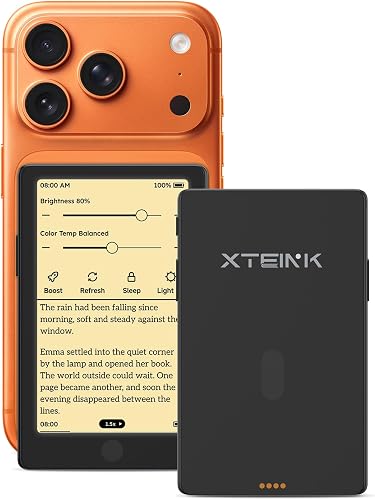
- 4.3-inch E Ink screen
- 72g weight
- Adjustable warm and cool front light
- Physical page-turn buttons
The 4.3-inch screen and 72g weight make this the pocket-size choice. Its touchscreen, physical buttons and adjustable front light offer several ways to read.
Pros
- Very small and light
- Front light has warm and cool settings
- Touchscreen and physical buttons
Cons
- Smallest screen in this group
- No waterproofing information
The Xteink X4 Pro is the small-screen choice for readers who want to carry a reader in a pocket or palm. Its 4.3-inch display and 72g weight make it the most compact option in this roundup.
You can turn pages with touchscreen gestures or physical side buttons. The front light has warm and cool settings, and the battery is described as lasting weeks on a charge.
The X4 Pro supports EPUB, TXT, MOBI and PDF, with 16GB storage and microSD support up to 256GB. Its small screen is best suited to readers who value portability and are comfortable with less page area.
Choose it for reading on short trips or in spare moments throughout the day. If you want a larger display for longer sessions, the 6-inch Kobo Clara BW is a more conventional size.
PocketBook Verse Pro: Best for format flexibility

- 6-inch E Ink touchscreen
- 25 supported formats
- IPX8 waterproofing
- Text-to-speech in 26 languages
The Verse Pro supports a wide range of book and document formats, including EPUB, PDF, CBR and CBZ. Text-to-speech and Bluetooth add listening options.
Pros
- Supports 25 formats
- Text-to-speech in 26 languages
- IPX8 waterproofing
Cons
- 6-inch screen rather than 7-inch
- No physical page-turn buttons named in its features
The PocketBook Verse Pro is a flexible 6-inch reader for people with books and documents in different formats. It supports 25 formats, including EPUB, PDF, CBR and CBZ, and can use text-to-speech in 26 languages.
Its SMARTlight adjusts brightness and color tone, with an automatic mode that adapts to the time of day and environment. Dark Mode is another option for low-light reading, and Bluetooth supports wireless headphones or other audio systems.
The Verse Pro has IPX8 protection for fresh-water immersion up to 2 meters deep for up to 1 hour. PocketBook also describes compatibility with online library services through Adobe DRM support.
Choose it if format range, text-to-speech and waterproofing are higher priorities than a 7-inch screen. If you want a similarly compact reader with Kobo's named built-in OverDrive service, compare the Kobo Clara BW.
PocketBook Era Lite: Best for a larger open-format reader

- 7-inch E Ink Carta 1300 screen
- Adaptive SMARTlight
- Supports 25 formats
- IPX4 splash resistance
A 7-inch screen, adaptive lighting and broad format support suit readers who want a larger open-format device. It also supports Bluetooth audiobooks and text-to-speech.
Pros
- 7-inch E Ink Carta 1300 screen
- Supports 25 formats
- Bluetooth audiobooks and text-to-speech
Cons
- IPX4 protects from splashes, not immersion
- No battery duration in the product bullets
The PocketBook Era Lite combines a 7-inch E Ink Carta 1300 screen with format support for a wide range of ebooks and documents. Adaptive SMARTlight lets you choose warmer or cooler tones, and the device supports Bluetooth audiobooks and text-to-speech.
Its open ecosystem is meant for readers who don't want to be tied to a single store. The product features also name pre-installed Libby and support for 25 formats.
The Era Lite has IPX4 water resistance, which protects against splashes. That is a different level of protection from the IPX8 devices in this roundup, so choose it for reading flexibility rather than immersion protection.
Pick the Era Lite if you want a larger screen and broad format support with audiobook features. For a waterproof 7-inch option with built-in library borrowing, the Kobo Libra Colour has stronger protection and named OverDrive support.
What should you compare before choosing an E Ink reader?
The most useful comparisons are the ones tied to your reading routine: screen size, color, lighting, water protection and store or format support. Extra features matter when you'll use them often.
Is a 6-inch or 7-inch E Ink reader better?
A 6-inch screen can make the whole device easier to carry, while 7 inches gives text and page layouts more room. The Kobo Clara BW and PocketBook Verse Pro have 6-inch screens; the Kindle Paperwhite, Libra Colour, Boox Go Color 7 Gen II and Era Lite have 7-inch screens.
For an even smaller option, the 4.3-inch Xteink X4 Pro trades page space for pocket-friendly size. Our guide to small e-readers that fit a pocket or purse looks more closely at compact choices.
Do you need color on an E Ink reader?
Color helps when you read comics, graphic novels, illustrated books or want color markups. The Kobo Libra Colour is built around ebooks, comics and note-taking in color, while the Boox Go Color 7 Gen II adds Android apps.
If most of your reading is novels or other text, a black-and-white display may suit you better. See our guide to the differences between E Ink and LCD for reading before paying more attention to color features.
Which lighting and water features matter?
Adjustable light can help you read across different room and outdoor conditions. The Kindle Paperwhite changes from white to amber, the Signature Edition auto-adjusts its front light, and Kobo and PocketBook models offer adjustable or adaptive lighting.
Check the protection rating if you read near water. The Kobo Libra Colour, Kobo Clara BW and PocketBook Verse Pro have IPX8 protection, while the PocketBook Era Lite is rated IPX4 for splashes.
For more on the difference between water-resistant options, read our waterproof e-reader picks.
Which E Ink reader fits the books you already have?
Store access and file formats can narrow the choice quickly. Kindle gives direct access to the Kindle Store, Kobo supports local library borrowing through OverDrive on the Libra Colour, and PocketBook lists support for a wide range of formats and online library services.
Boox takes a different approach by running Android 13 and supporting third-party apps. If you're comparing these brands, our Kobo vs Boox guide explains how their approaches differ.
Which E Ink reader should you choose?
The Kindle Paperwhite 16GB is the best E Ink reader for most people who want a focused daily reading device with a large glare-free screen and long stated battery life. Choose the Signature Edition if automatic lighting and 32GB storage matter more.
Pick Kobo for color, physical buttons or built-in library borrowing on the Libra Colour, or choose the Clara BW for a smaller black-and-white screen. Select Boox for Android apps, PocketBook for broad format support, or Xteink for a reader small enough to carry in a pocket.
Our top 3 picks at a glance
-
1
-
2
Best for automatic lighting
Kindle Paperwhite Signature Edition 32GB
8.9/10 our score
See it on Amazon -
3
Frequently asked questions
Which E Ink reader is best for everyday reading?
The Kindle Paperwhite 16GB is a strong everyday pick if you want a 7-inch glare-free screen, adjustable white-to-amber light and a device without social media or notifications. Choose Kobo if built-in library borrowing or color matters more, and Boox if you want Android apps.
Your preferred ebook store and screen size can matter as much as extra features.
Are color E Ink readers good for regular books?
Yes. You can read regular books on color E Ink, and the color adds context to covers, comics and illustrations.
The Kobo Libra Colour and Boox Go Color 7 Gen II both use color screens.
Color E Ink has a darker or grayer appearance than LCD or LED screens, so consider whether color is worth that tradeoff for your reading.
Can an E Ink reader borrow library books?
The Kobo Libra Colour has built-in OverDrive support for borrowing ebooks from a local library. PocketBook also describes compatibility with online library services.
Check that your library supports the reader's borrowing service before choosing a device for that purpose.
Should I choose a 6-inch or 7-inch E Ink reader?
A 6-inch reader such as the Kobo Clara BW or PocketBook Verse Pro gives you a more compact screen for everyday books. A 7-inch screen offers more room for pages, comics or larger text, as on the Kindle Paperwhite and Kobo Libra Colour.
Think about how you hold and carry the reader as well as what you read.


