Xteink X4 Pro Review: Is This Pocket Reader Worth It? (October 2026)
The Xteink X4 Pro is a pocket reader for people who want a small screen, built-in front light and page-turn buttons. This Xteink X4 review compares it with the Kindle 16GB, X4 Classic and X3 so you can choose by screen size, lighting and file needs.
On this page (9 sections)
- What does this Xteink X4 review recommend?
- What stands out about the X4 Pro?
- How should you choose between these readers?
- Is the X4 Pro comfortable for daily reading?
- How do you set up the X4 Pro?
- Who should skip the X4 Pro?
- Is the Kindle 16GB a better fit?
- How can you avoid common buying mistakes?
- Is the Xteink X4 Pro worth it for you?
The Xteink X4 Pro is a pocket reader for people who want a front light and page-turn buttons in a very small device. This Xteink X4 review compares its 4.3-inch screen and supported files with a larger Kindle and two smaller Xteink options.
The Pro supports EPUB, TXT, PDF and MOBI files. Touch gestures and side buttons give you two ways to turn pages, while the adjustable warm and cool front light helps when the room is dim.
The main question is whether pocketability matters more to you than screen space. If you read for long stretches or want more words visible at once, the 6-inch Kindle 16GB is the better fit.
What does this Xteink X4 review recommend?
The X4 Pro is the strongest choice here when you want a small reader with its own front light. Choose the Kindle 16GB if a larger screen is more useful, the X4 Classic if you read in well-lit places, or the X3 if low weight is your first priority.
Xteink X4 Pro: Best for dim-light commuters
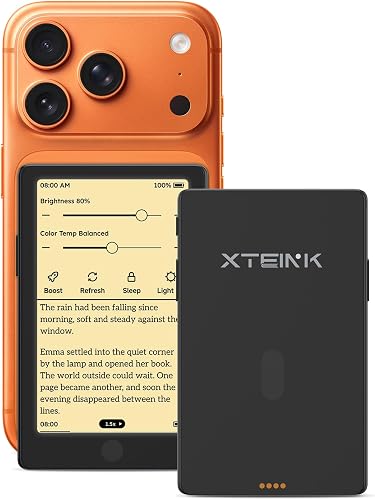
- 4.3-inch E Ink screen
- Adjustable warm and cool front light
- Touchscreen and physical page-turn buttons
- 72 g
A compact reader with a front light, touch controls and physical page-turn buttons. Its small screen fits pocket reading, but shows less text at once than a 6-inch reader.
Pros
- Adjustable warm and cool front light
- Physical page-turn buttons and touch gestures
- 72 g weight and magnetic back
- Supports EPUB, TXT, PDF and MOBI
Cons
- 4.3-inch screen gives less reading area than a standard-size reader
- Compact screen may mean more frequent page turns
- No water-resistance rating is provided
The Pro combines a 4.3-inch display with a 72 g body. It is designed for carrying in a small pocket or holding in one hand, though its compact screen leaves less room for text than a 6-inch reader.
This makes it a useful secondary reader for commutes, travel and short breaks. As a main device, it makes more sense if you are comfortable reading on a small display and turning pages more often.
What stands out about the X4 Pro?
The X4 Pro's clearest advantage is the combination of front lighting, touch input and physical buttons in a pocket-size reader. Its file support also covers several common ebook formats.
Is the Xteink X4 Pro front light useful?
Yes, the adjustable warm and cool front light makes the Pro easier to use in changing room light. You can set the brightness for your surroundings and read in darkness without a separate lamp.
That feature separates it from the X4 Classic and X3, which have no stated front light. If you often read outside in daylight or beside a lamp, the other models may still suit you.
How do the Xteink X4 Pro controls work?
The Pro lets you turn pages with touch gestures or physical side buttons. Buttons can help when you want to hold the device without tapping the screen, while touch offers a familiar way to navigate a book.
The X4 Classic also has physical buttons, plus a shake-based page-turn feature. The X3 offers physical buttons and gyroscope page turning, so consider whether you want those motion controls or prefer the Pro's touch option.
Which files can you read on the X4 Pro?
The Pro supports EPUB, TXT, PDF and MOBI. It has 16 GB of internal storage and supports microSD cards up to 256 GB, giving you room for a library of compatible books and documents.
Before buying, check the formats and restrictions on the books you actually plan to read. A file format match alone may not be enough if a book is protected or tied to a service that does not allow transfer.
How should you choose between these readers?
Choose by screen size first, then lighting and file needs. This order helps avoid paying attention to small feature differences when the basic reading experience may not suit you.
| Reader | Screen | Weight | Light | Controls |
|---|---|---|---|---|
| Xteink X4 Pro | 4.3 in | 72 g | Adjustable warm and cool front light | Touch, gestures and physical buttons |
| Xteink X4 Classic | 4.3 in | 68 g | No front light stated | Physical buttons and shake function |
| Xteink X3 | 3.7 in | 58 g | No front light | Physical buttons and gyroscope page turn |
Pick the Pro if you need built-in lighting and want both touch and buttons. Pick the Classic if the same screen size appeals but you usually read where lighting is available.
Pick the X3 if minimum weight is more important than screen size or a front light, and your books are DRM-free EPUB or TXT. If you want a more traditional display area, the Kindle is the clear choice among these options.
For a wider view of portability, compare small e-readers that fit a pocket or purse. Our e-reader types and screen guide can help if you are still deciding between screen sizes and device styles.
Is the X4 Pro comfortable for daily reading?
The X4 Pro is convenient to carry, but its 4.3-inch screen is a real compromise for long sessions. Fewer lines fit on screen than on a 6-inch reader, which can mean more page turns and a tighter reading layout.
For short sessions during a commute or while waiting, a smaller body can be easier to keep within reach. For novels read over an hour or more, think about whether you prefer a larger font or more text per page.
The magnetic back can attach to compatible magnetic surfaces. Treat it as a carry or placement feature, not a substitute for a protective sleeve, and avoid putting pressure on the glass screen in a crowded bag.
The Pro's compact size also makes it easy to misplace among other small items. Keep it in a consistent pocket or pouch so you can find it quickly and reduce the chance of it being bent or struck.
How do you set up the X4 Pro?
Start by charging the reader, connecting it to a stable Wi-Fi network if you need online features, and transferring one or two compatible books before loading a full library. A small first batch makes it easier to confirm that your files display as expected.
The XTEINK app can transfer and convert books or comics, and the Pro supports Wi-Fi. If a network is not detected, check that the router has 2.4 GHz Wi-Fi enabled and that the reader is within range.
Keep a copy of important books on your computer or phone before converting or moving files. If you use a microSD card, check that the reader recognizes it before relying on it as your only copy of a library.
For routine care, keep the screen clean with a soft cloth and avoid sharp objects, heavy pressure and bending. If the device becomes unresponsive, use the reset button and restart it; if it will not charge, check the cable connection and clean the charging contacts before trying another cable or adapter.
Who should skip the X4 Pro?
Skip the Pro if you want a large page, a water-resistance rating, or a reading device for a library that depends on unsupported formats or protected files. Its compact screen is the core trade-off, and no water-resistance rating is provided.
The X4 Classic may be a better fit if you do not need front lighting and want physical buttons in a slightly lighter package. The X3 suits readers who value the smallest and lightest option and can use its narrower format support.
If you want to read in the bath, at the beach or beside a pool, choose a device with a stated water-resistance rating. See our waterproof e-reader guide before making that decision.
Is the Kindle 16GB a better fit?
The Kindle 16GB is better if you want a 6-inch screen, adjustable front light and dark mode. It is larger than the Xteink readers, but the display gives you more room for text.
Amazon says the Kindle can last up to 6 weeks on a charge. It also offers access to Kindle Unlimited with a subscription, which may suit readers who want to explore books through Amazon's ecosystem.
The Pro is the better match for pocket carry and physical page-turn buttons. For more options outside Amazon's lineup, see our Kindle alternatives for readers who want options or simple guide to choosing an e-reader.
How can you avoid common buying mistakes?
Check your reading habits and file library before choosing a compact reader. Buyers often focus on weight, then discover that screen size or book compatibility matters more day to day.
- Do not assume the smallest screen will feel easiest. Smaller devices are easier to carry, but may show fewer words per page.
- Do not treat all Xteink models as interchangeable. The Pro has a front light and touch controls; the Classic and X3 have different control options and no stated front light.
- Check file compatibility before transferring a large library. The Pro supports four named formats, while the X3's book support is limited to DRM-free EPUB and TXT.
- Do not expect water protection without a stated rating. Keep the Pro away from wet settings unless you have confirmed the protection you need.
- Test your transfer process with a few files first. This can reveal format or network issues before you organize a larger collection.
Is the Xteink X4 Pro worth it for you?
The Xteink X4 Pro is worth considering if pocket size, a front light and physical page-turn buttons are your priorities. Choose the Kindle 16GB for a larger reading area, the X4 Classic for a pocket reader used in bright settings, or the X3 when minimum weight matters more than lighting and screen space.
If the Pro sounds close but you are unsure about its compact format, compare it with the best small e-readers for portable reading. Our score reflects how its features match the needs of readers searching for an Xteink X4 review.
Frequently asked questions
Is the Xteink X4 Pro worth it?
The Xteink X4 Pro is worth considering if you want a small E Ink reader with an adjustable front light, touch controls and physical page-turn buttons. Its 4.3-inch screen is much smaller than the 6-inch Kindle, so choose based on whether pocket size or a roomier reading area matters more.
Does the Xteink X4 Pro have a front light?
Yes. The X4 Pro has adjustable warm and cool front-light controls.
Use them to set the light for your room or to read in darkness without an external reading light.
What file formats does the Xteink X4 Pro support?
The X4 Pro supports EPUB, TXT, PDF and MOBI files. Check that your own books use a compatible format and can be transferred without restrictions before choosing it.
Kindle 16GB is an alternative if you want a reader centered on Amazon's book library.
How does the Xteink X4 Pro compare with the Xteink X3?
The X4 Pro has a 4.3-inch screen, weighs 72 g, and includes a front light, touchscreen and physical buttons. The X3 is lighter at 58 g and has a smaller 3.7-inch screen, physical buttons and gyroscope page turning, but no front light.


