9 Best Kindle Alternatives for Readers Who Want Options (October 2026)
The best alternatives to Kindle e-readers include the Kobo Libra Colour for Kindle alternatives with color, the Kobo Clara BW for Kindle alternatives in black and white, and the Kobo Clara Colour for Kindle alternatives in small color.
On this page (9 sections)
- How to choose among Kindle alternatives
- How we chose these Kindle alternatives
- Which Kindle alternative fits your reading style?
- What should you check before leaving Kindle?
- Is a color Kindle alternative worth choosing?
- How do you set up a Kindle alternative?
- What common mistakes should you avoid?
- How should you care for an E Ink reader?
- Which Kindle alternative should you choose?
The best Kindle alternatives include readers for different habits, from Kobo library borrowing to Boox Android apps and PocketBook format support. The Kobo Libra Colour is our top pick for its color screen, page-turn buttons and built-in OverDrive, while the Kobo Clara BW offers a compact black-and-white display.
Before switching, think about where your books come from and which features you use most. An e-reader can feel familiar while still having a different store, library service or file workflow.
If you're choosing your first device, our guide to how e-readers work and what types are available explains the main screen and device differences. For a decision based on your own habits, start with which e-reader should you buy.
Our picks at a glance
-
1

-
2

-
3

- 4
 Best for Kindle alternatives with Android appsCheck it
 - 5
 Best for Kindle alternatives in your pocketCheck it
 - 6
 Best for Kindle alternatives with many formatsCheck it
 - 7
 Best for Kindle alternatives with spoken textCheck it
 - 8
 Best for Kindle alternatives with handwritten notesCheck it
 - 9
 Best for Kindle alternatives with AI toolsCheck it
How to choose among Kindle alternatives
Choose by your reading habits, book sources and preferred screen size before comparing extras. A feature matters only if it supports a routine you already have or want to start.
First, write down where your books come from: a bookstore, a library, personal files, subscriptions or apps. Then check whether the reader you want works with those sources, since moving to another brand can change how you find and open books.
Next, decide whether color, buttons, a small body or note taking would change how often you read. For mostly novels, a compact black-and-white screen is usually enough; comics, diagrams and colorful highlights give color E Ink a clearer purpose.
Finally, think about how much setup you are willing to do. Kobo and PocketBook models here focus on reading features and content formats.
Boox runs Android and supports third-party apps. More choice can be useful, but it also means you may need to configure apps and accounts yourself.
How we chose these Kindle alternatives
These Kindle alternatives cover distinct reasons to leave Amazon's reader ecosystem, including library borrowing, color screens, app choice, portability and note taking. We compared product features and format support against those needs.
Our scores reflect how well each device's stated features fit common reading needs. We gave more weight to practical reading functions and clear use cases, while accounting for tradeoffs such as a small screen or a more involved app workflow.
A switch can involve more than choosing hardware. Read whether you can read Kindle books on a Kobo before moving a library, and check the formats you use most.
| Product | Best for | Screen | Storage | Water protection | Our score |
|---|---|---|---|---|---|
| Kobo Libra Colour | Kindle alternatives with color | 7 in color E Ink | 32 GB | IPX8 | 8.8 |
| Kobo Clara BW | Kindle alternatives in black and white | 6 in E Ink Carta 1300 | 16 GB | IPX8 | 8.6 |
| Kobo Clara Colour | Kindle alternatives in small color | 6 in color E Ink | 16 GB | IPX8 | 8.3 |
| Boox Go Color 7 Gen II | Kindle alternatives with Android apps | 7 in color E Ink | 64 GB | 8.0 | |
| Xteink X4 Pro | Kindle alternatives in your pocket | 4.3 in | 16 GB, expandable by microSD | 7.9 | |
| PocketBook Verse Pro | Kindle alternatives with many formats | 6 in E Ink Carta | 16 GB | IPX8 | 7.4 |
| PocketBook Verse Pro Color | Kindle alternatives with spoken text | 6 in color E Ink | 16 GB | IPX8 | 7.3 |
| Kobo Elipsa 2E | Kindle alternatives with handwritten notes | 10.3 in | 32 GB | 7.0 | |
| AiPaper Reader | Kindle alternatives with AI tools | 6.13 in Carta 1300 E Ink | 128 GB | 6.8 |
Which Kindle alternative fits your reading style?
The Kobo Libra Colour is the most balanced pick here, while each other reader serves a more specific preference. Match screen size, controls and content access to the way you actually read.
Kobo Libra Colour: Best for Kindle alternatives with color
- 7 in color E Ink
- Page-turn buttons
- IPX8 waterproof
- Built-in OverDrive borrowing
A flexible choice for readers who want color content, page-turn buttons and library borrowing in one device. Its larger screen also supports Kobo Stylus 2 annotations, with the stylus sold separately.
Pros
- Color display
- Page-turn buttons
- Built-in OverDrive
Cons
- Stylus sold separately
- Larger than 6 in models
The Kobo Libra Colour is a strong fit if you want a color screen with dedicated reading controls. Its 7 in display, page-turn buttons and screen rotation support portrait and landscape reading.
Color can help show comics, graphic novels, illustrations and book covers. Kobo also supports colorful markups with the Kobo Stylus 2, which is sold separately.
The device is IPX8 waterproof for up to 60 minutes in up to 2 m of water. Built-in OverDrive supports borrowing eBooks from a local library, while 32 GB of storage offers room for books and up to 150 Kobo audiobooks.
Choose it for color, buttons and library borrowing in one reader. Skip it if you mainly read plain text and prefer a smaller, simpler device; the Clara BW is a better fit for that job.
Kobo Clara BW: Best for Kindle alternatives in black and white
- 6 in glare-free E Ink
- ComfortLight PRO
- IPX8 waterproof
- 16 GB storage
This compact Kobo focuses on text with a glare-free black-and-white screen, optional Dark Mode and adjustable brightness and color temperature. It also supports audiobooks over Bluetooth.
Pros
- Compact 6 in screen
- Adjustable light and Dark Mode
- Waterproof
Cons
- No color screen
- No physical page-turn buttons named
The Kobo Clara BW suits readers who mostly want novels and other text on a compact black-and-white screen. Its 6 in E Ink Carta 1300 display is glare-free, with ComfortLight PRO controls for brightness and color temperature.
Optional Dark Mode gives you another display setting for low light. The model has 16 GB of storage and supports audiobooks over Bluetooth.
The Clara BW is IPX8 waterproof for up to 60 minutes in up to 2 m of water. It has no color display or named page-turn buttons, which helps explain its focused role in this group.
Pick it if you want a straightforward, waterproof Kobo for text. Skip it if colorful comics or physical page-turn buttons are central to your reading; the Libra Colour is a more natural match.
Kobo Clara Colour: Best for Kindle alternatives in small color
- 6 in color E Ink
- Color highlights
- IPX8 waterproof
- Built-in OverDrive
A smaller color option for book covers, comics and graphic novels. Color highlighting and built-in OverDrive add useful tools without moving up to a 7 in reader.
Pros
- Color screen and highlights
- Compact size
- Library borrowing
Cons
- No physical page-turn buttons named
- Smaller screen for comics
The Kobo Clara Colour brings color to a 6 in reader that stays small enough for everyday carry. Its Kaleido 3 screen displays color covers, comics and graphic novels, while the touchscreen supports color highlights.
ComfortLight PRO adjusts brightness and color temperature, and Dark Mode is available. The Clara Colour is IPX8 waterproof for up to 60 minutes in up to 2 m of water.
The 16 GB model also supports audiobooks and built-in OverDrive borrowing. The smaller screen works well for ordinary books, though readers who spend a lot of time with comics may prefer the Libra Colour's larger display.
Choose it for color in a compact Kobo. Skip it if you want more room for graphic novels or need physical page-turn buttons; compare it with the Libra Colour before deciding.
Boox Go Color 7 Gen II: Best for Kindle alternatives with Android apps
- 7 in Kaleido 3 color E Ink
- Android 13
- 64 GB storage
- Page-turn buttons
Android 13 and support for third-party apps make this a fit for readers who want app choice on an E Ink device. The screen also has page-turn buttons and a microSD card slot.
Pros
- Android app support
- Page-turn buttons
- microSD card slot
Cons
- Active stylus not included
- Color E Ink is darker than LCD or LED screens
The Boox Go Color 7 Gen II suits readers who want Android app choice on an E Ink screen. It runs Android 13, supports third-party apps and has 64 GB of storage plus a microSD card slot.
Its 7 in Kaleido 3 display shows color, and physical page-turn buttons provide a way to move through books without tapping the screen. The front light offers warm and cold settings.
Color E Ink screens are darker or grayer than LCD and LED screens. The active InkSense stylus is supported but not included, and the device does not support EMR styluses.
Pick Boox if app flexibility matters more than a dedicated store experience. Skip it if you want a simple reader with library borrowing already built in, or if you expect color to look like a tablet screen.
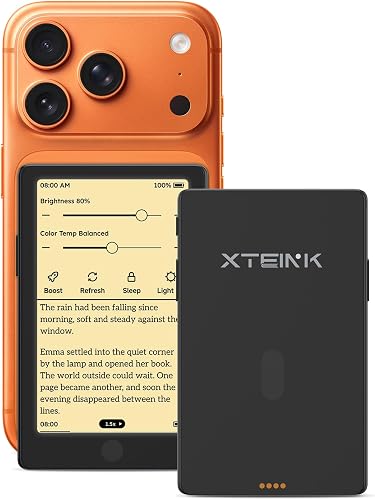
Xteink X4 Pro: Best for Kindle alternatives in your pocket
- 4.3 in E Ink screen
- 72 g weight
- Front light
- Physical page-turn buttons
Its 4.3 in screen and 72 g weight make this the pocket-size pick. Touch controls and physical page-turn buttons give you two ways to move through a book.
Pros
- Very small and light
- Front light
- Physical buttons
Cons
- Small screen for PDFs and comics
- Compact size may not suit long reading sessions
The Xteink X4 Pro is a compact choice, with a 4.3 in screen and a weight of 2.5 oz. Its front light has warm and cool controls, and physical page-turn buttons sit alongside touch and gesture controls.
It supports EPUB, TXT, PDF and MOBI files, with microSD card support up to 256 GB. That makes it useful for carrying a small reader and a collection of supported files.
The small display leaves less room for large text, documents and comics than the 6 in or 7 in choices above. You may need to turn pages more often or adjust text size to keep a comfortable layout.
Choose it when small size matters most. Skip it as your main device if you read long sessions with large fonts, PDFs or comics; a 6 in screen gives those pages more room.
PocketBook Verse Pro: Best for Kindle alternatives with many formats
- 6 in E Ink Carta screen
- IPX8 waterproof
- Text-to-Speech
- 25 supported formats
Broad format support suits readers who keep books and documents in several file types. Text-to-Speech, audiobook support and adjustable SMARTlight add listening and lighting options.
Pros
- Wide format support
- Text-to-Speech
- Waterproof
Cons
- No color screen
- No physical page-turn buttons named
The PocketBook Verse Pro is a good match for readers with books and documents in different formats. It supports 25 formats, including EPUB, PDF, DJVU, CBR and CBZ, and is compatible with online library services using Adobe DRM.
The 6 in E Ink Carta screen has adjustable SMARTlight, including automatic adjustment and Dark Mode. Text-to-Speech can read text in one of 26 languages, and Bluetooth supports wireless headphones for audio.
Its IPX8 protection is rated for immersion in fresh water up to 2 m for up to 1 hour. The screen is black and white, so look to the color PocketBook model if you want illustrations and covers in color.
Pick it for format support, spoken text and a waterproof body. Skip it if color is a must, and check that your particular library service and file restrictions work with your collection before switching.
PocketBook Verse Pro Color: Best for Kindle alternatives with spoken text
- 6 in Kaleido 3 color E Ink
- Text-to-Speech
- Bluetooth audio
- IPX8 waterproof
This compact color reader pairs a Kaleido 3 screen with Text-to-Speech and Bluetooth audio support. SMARTlight lets you adjust the screen's color tone.
Pros
- Color screen
- Text-to-Speech and Bluetooth
- Waterproof
Cons
- No physical page-turn buttons named
- No battery life figure provided
The PocketBook Verse Pro Color has a 6 in Kaleido 3 color screen, along with Text-to-Speech and Bluetooth audio support. SMARTlight adjusts the screen's color tone.
It has IPX8 water protection and 16 GB of storage. No battery life figure is specified, so consider your charging habits before choosing it over a reader with a stated battery estimate.
Choose it for a color PocketBook with text-to-speech. Skip it if you need a physical page-turn button or want a documented battery estimate; the black-and-white Verse Pro has broader format details.
Kobo Elipsa 2E: Best for Kindle alternatives with handwritten notes
- 10.3 in E Ink screen
- Kobo Stylus 2 included
- Markup for eBooks and PDFs
- 32 GB storage
The large screen and included Kobo Stylus 2 suit readers who also mark up eBooks and PDFs. It's better suited to a desk or bag than a small pocket.
Pros
- Large screen for documents
- Stylus included
- Markup for eBooks and PDFs
Cons
- Largest device here
- No waterproof rating named
The Kobo Elipsa 2E is an option for readers who want to write on eBooks and PDFs as well as read them. Its 10.3 in glare-free screen gives documents and notes more room than the smaller models.
Kobo Stylus 2 is included, and the device supports handwriting, highlights and underlining on eBooks and PDFs. It has 32 GB of storage and ComfortLight PRO for adjustable brightness and color temperature.
This larger reader is designed around reading and note taking, so it may be less convenient for a small bag or pocket. Consider it when markup is part of your routine rather than an occasional extra.
Pick it for a large reading and writing surface. Skip it if you mostly read novels on the move or want a waterproof model; the smaller Libra Colour supports Kobo Stylus 2 separately.
AiPaper Reader: Best for Kindle alternatives with AI tools
- 6.13 in Carta 1300 E Ink
- 128 GB storage
- 4G connectivity
- Adjustable cool front light
A 6.13 in reader with an AI button, screenshot questions and 128 GB storage. Its light offers adjustable cool light, with no warm light option.
Pros
- Large storage capacity
- 4G connectivity
- AI button and screenshot questions
Cons
- No warm light
- No stylus handwriting support
The AiPaper Reader is for readers who want AI tools built into a portable E Ink device. It has a 6.13 in Carta 1300 screen, 128 GB storage and 4G connectivity, along with an AI button for voice or text questions.
Its screenshot question feature can analyze a selected screen area, and AI responses can be saved to a Knowledge Base. The front light offers 20 levels of cool light, with no warm light option.
The reader does not support stylus handwriting and has no built-in speaker. Bluetooth headphones can be used for audiobooks.
Choose it if AI tools and storage are your priorities. Skip it if you want warm light, handwritten notes or a built-in speaker; Kobo and PocketBook offer more reading-focused choices.
What should you check before leaving Kindle?
Check your book formats, library access and the features you use every week before switching. A similar screen does not guarantee the same books or services will work in the same way.
Make a short list of the sources you use now: purchased eBooks, library loans, personal documents and audiobooks. Beside each one, note the file type or app that opens it, then compare those details with the new reader's format support and services.
The Libra Colour and Clara Colour include OverDrive borrowing. Kindle purchases are a separate issue, so read our guide to Kindle books on Kobo before moving to a different ecosystem.
For other e-readers, check whether the formats you rely on are supported. PocketBook names broad format support, while Boox supports Android apps, but app availability and book access still depend on the services you use.
Is a color Kindle alternative worth choosing?
A color reader makes the most sense if you regularly read comics, graphic novels, illustrated books or use color highlights. For mostly text, a black-and-white model such as the Kobo Clara BW is a more focused fit.
Color E Ink does not look like a phone or tablet screen. It has a darker or grayer appearance than LCD or LED, so choose it for color content rather than a bright, vivid display.
Think about the pages you read most. Color covers and highlights can be useful even if you rarely open a comic, but a color screen won't improve a plain novel in the same way that a comfortable size or light control might.
If color is a nice extra rather than a need, compare more E Ink readers for everyday reading. If you're deciding between screen types, our guide to E Ink vs LCD for reading explains the tradeoffs.
How do you set up a Kindle alternative?
Start by connecting the reader to Wi-Fi, signing in to its store or service, and setting the text size and light for your usual reading conditions. Then try opening one book from each source you expect to use before moving your whole library.
For a Kobo, check the store and OverDrive borrowing. Confirm the file workflow you plan to use.
For PocketBook, confirm that the formats and library service you depend on are supported. For Boox, install only the reading apps you need at first, then adjust settings after you see how they behave on E Ink.
Keep your original Kindle reader and library available while you sort out access. That gives you time to confirm which books work on the new device and which need a different route.
If you transfer personal books or documents, use a supported file format and keep a copy of the originals. Our guide to transferring books to a Kindle covers a related file-management workflow, while reading Kindle books on Kobo explains the compatibility question.
What common mistakes should you avoid?
The most common switching mistake is choosing by screen features before checking the books and services you use. Verify content access first, especially if your library includes Kindle purchases, library loans or files with digital restrictions.
Another mistake is expecting color E Ink to look like a phone display. Choose color for comics, illustrations and colored annotations, and choose a black-and-white reader if crisp text and a simpler screen matter more.
Don't assume a larger device will be easier for every routine. A 10.3 in notebook is useful for PDFs and markup, but a 4.3 in reader is easier to carry; decide where you read before picking the size.
Finally, don't treat every extra as a benefit. Android apps and AI tools add options, but they may not matter if you mainly want to open a novel and read.
Handwriting support may also go unused. Pay for complexity only when it solves a real need.
How should you care for an E Ink reader?
Use a case or a safe storage spot when carrying the reader with keys, chargers or other objects that could press against its screen. Keep the charging port and any charging contacts clear of dust, and follow the instructions for the specific model if it needs a reset or software update.
Water protection is useful for reading near water, but it isn't a reason to ignore the manufacturer's limits. The waterproof Kobo and PocketBook models here have IPX8 protection with stated immersion limits; follow those limits and dry the device before charging.
Keep a copy of important personal files somewhere other than the reader. If you use a stylus, store it where it won't scratch the screen or get lost, and check whether it is included before buying.
Which Kindle alternative should you choose?
Choose the Kobo Libra Colour if you want one device with color, page-turn buttons and built-in library borrowing. Pick the Clara BW for straightforward black-and-white reading, the Boox Go Color 7 Gen II for Android apps, or the Xteink X4 Pro for pocket carry.
Choose the Clara Colour if you want color in a smaller Kobo, the PocketBook Verse Pro if broad format support matters, or the Verse Pro Color for color with spoken text. The Kobo Elipsa 2E suits reading and handwritten document notes, while the AiPaper Reader is for readers who will use its AI tools.
Before you switch, make sure your books and library services will work on the new device. For a final side-by-side decision based on your reading habits, use our simple e-reader chooser.
Our top 3 picks at a glance
-
1
-
2
-
3
Frequently asked questions
What is the best Kindle alternative?
The Kobo Libra Colour is a strong all-around alternative if you want color E Ink, page-turn buttons and built-in OverDrive borrowing. For a simpler black-and-white reader, consider the Kobo Clara BW.
Your best fit depends on the books and services you use, so check format support and library access before you switch.
Can you read Kindle books on a Kobo?
A Kobo does not natively read Kindle books in every format. Check the book's format and any digital restrictions before buying a Kobo, and see our guide to reading Kindle books on Kobo for the details.
If you want to keep using your Kindle library as it is, staying with a Kindle may be simpler.
Are Kobo and Boox the same kind of e-reader?
Both use E Ink screens, but they suit different preferences. Kobo models here focus on reading features such as OverDrive borrowing, while the Boox Go Color 7 Gen II runs Android 13 and supports third-party apps.
For a closer comparison, read Kobo vs Boox.
Which Kindle alternative is best for travel?
The Xteink X4 Pro is the smallest option here, with a 4.3 in screen and a stated weight of 72 g. If you want a larger display for regular reading, the 6 in Kobo Clara BW or PocketBook Verse Pro may be easier to use.
Compare more compact options in our best small e-readers guide.


