Kobo Libra Colour vs Kobo Sage: Which to Buy? (November 2026)
Pick the Kobo Libra Colour for color covers and an easier grip; pick the Kobo Sage for a bigger screen for documents and PDFs. In the Kobo Libra Colour vs Kobo Sage choice, screen size and color matter more than the gap in storage.
On this page (8 sections)
- Kobo Libra Colour vs Kobo Sage at a glance
- Why the color screen changes the Libra Colour decision
- What the bigger Sage screen gives you
- Size, weight and reading in one hand
- Storage and the rest of the spec sheet
- The pen works on both, so decide on screen first
- Which Kobo should you buy?
- Verdict: the Libra Colour wins for most readers
Pick the Kobo Libra Colour for color covers and a light one-handed grip; pick the Kobo Sage for the larger screen when you read PDFs and documents. In this Kobo Libra Colour vs Kobo Sage comparison, the screen you look at all day decides more than the storage inside.
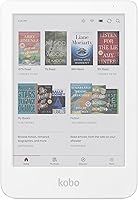
The Libra Colour puts a 7-inch color E Ink screen in a body with page-turn buttons. The Sage keeps an 8-inch black-and-white screen aimed at people who read documents and want more words per page.
Both take the same Kobo Stylus 2, so the pen decision doesn't split them. What splits them is size, color and how each one feels in your hand for a long session.
This comparison works through those differences section by section, then names a winner for each kind of reader.


Kobo Libra Colour vs Kobo Sage at a glance
The Libra Colour wins on color and portability; the Sage wins on screen area. Put the two side by side and the trade is clear.
The Libra Colour's 7-inch color screen shows cover art, comics and highlighted text in color. That matters if you read magazines, graphic novels or color-coded study material.
The Sage's 8-inch screen gives you more room for a page. One extra inch doesn't sound like much until you read a PDF with tables or a manga spread that needs to fit without shrinking.
Side-by-side comparison table
| Feature | Kobo Libra Colour | Kobo Sage |
|---|---|---|
| Screen size | 7 in | 8 in |
| Screen type | Color E Ink | Black-and-white E Ink |
| Page-turn buttons | Yes | Yes |
| Stylus support | Kobo Stylus 2 | Kobo Stylus 2 |
| Typical buyer | Color readers, commuters | PDF and document readers |
| Case options here | Clear case or SleepCover | kwmobile flip case |
Neither reader needs the pen to read. The pen only matters if you plan to mark up books and PDFs or keep a notebook on the device.
Why the color screen changes the Libra Colour decision
Color is the Libra Colour's whole reason to exist, and it's worth it if your library has covers, comics or color markup. For plain novels, color adds less than you might expect.
The Libra Colour renders book covers and illustrations in color. On a shelf of fantasy or travel books, that makes browsing feel closer to a paper library.
Highlighting works in color too. Students who code notes by subject or importance can color-code without a separate app.
When color pays off and when it doesn't
Color earns its place for comics, graphic novels, cookbooks and illustrated guides. Those are the books where black-and-white screens flatten the experience.
If you only read text novels, the color layer adds little. The page stays readable, but the extra feature isn't doing work for you.
Our Kobo Libra Colour review goes deeper on the color panel if you're leaning that way. It covers how the screen reads in everyday use.
What the bigger Sage screen gives you
The Sage's 8-inch screen is the better fit for PDFs, textbooks and manga. More inches means less pinching and zooming to read a full page.
Documents built for letter paper are hard on a small screen. An 8-inch display won't match a printed page either, but it needs less resizing and keeps tables and diagrams together more often.
The Sage still uses black-and-white E Ink. That's a strength for long text sessions, since the screen stays crisp and easy on the eyes for hours.
Who notices the extra inch most
Students reading course PDFs will notice it first. So will anyone who reads manga or comics with detailed panels, or works through technical books with charts.
Casual novel readers notice it less. For a paperback-style book, the Libra Colour's 7-inch page holds plenty of text, and the lighter body counts for more.
Size, weight and reading in one hand
The Libra Colour is the easier reader to hold for long stretches; the Sage asks for two hands or a case with a strap. The side grip and page-turn buttons help both, but the smaller screen wins on weight.
The Libra Colour's 7-inch screen sits in a body you can balance in one hand while the thumb works the page buttons. That's the reading posture most people settle into on a commute or in bed.
The Sage's larger screen needs more support. A flip case with a hand strap, like the kwmobile cover in this comparison, helps you hold it one-handed without gripping the edge.
Cases that change the feel
A clear case keeps the Libra Colour light and shows off its color. The Kobo Libra Colour Clear Case adds only 51 g and still leaves every button and port open.
The clear case is also anti-slip and scratch resistant. Its precise cutouts keep the charging port and buttons reachable, so you never have to peel the shell off to top up the battery or change a setting.
It comes in six finishes, including Black, Butter Yellow and Dusk Blue. That's a small thing, but the case becomes part of the reader's look instead of hiding it.
If you want hands-free reading, the SleepCover adds a two-way stand. Its 124 g brings the Libra Colour closer to the Sage in hand, but you gain a stand for landscape and portrait reading.
The SleepCover's sleep and wake technology turns the screen off when you close the cover and on when you open it. That conserves battery over a week of short reading sessions, and the two-way stand keeps the reader upright for hands-free reading in landscape and portrait.
Both Libra Colour cases are built from recycled material. That matters if you care about the materials behind your accessories as much as the e-reader itself.
For the Sage, the kwmobile case brings a hand strap and a card slot. At 180 g it's the heavier option here, but the strap makes the bigger screen easier to manage.
What the case weights mean in practice
The numbers sound small, but they stack onto the reader in your hand. The clear case adds 51 g to the Libra Colour, while the SleepCover more than doubles that to 124 g.
The Sage's kwmobile case is heavier again at 180 g. On a bigger device, that weight spreads across more surface, and the hand strap takes some of it off your fingers.
If you read in bed with the device held up, weight matters most. A lighter case and the smaller screen are the combination that tires your wrist least.
Storage and the rest of the spec sheet
Storage is a smaller difference than screen size, so don't let it drive the choice. Both readers hold a large library, and either one can carry more books than most people read in a year.
The bigger factor is how you load books. If you keep a large PDF library or a collection of comics, the Sage's larger screen helps more than extra storage does.
Where the Libra Colour pulls ahead
Color is the headline. The Libra Colour also gives you the option to mark up and highlight in color with the Kobo Stylus 2.
That's the feature set for a reader who wants their e-reader to feel modern. Covers, illustrations and notes all get the color treatment.
Where the Sage pulls ahead
Screen area is the Sage's advantage. An 8-inch display fits more words per page and makes documents easier to read without zooming.
If your reading skews to work material, academic PDFs or large-format comics, the Sage's screen is the reason to choose it. Our Kobo vs Boox comparison covers how Kobo's approach compares with a more open Android e-reader if you want app support too.
The pen works on both, so decide on screen first
The Kobo Stylus 2 fits the Libra Colour and the Sage, so pen support doesn't split them. Pick the screen you want, then add the pen if you mark up books.
The Kobo Stylus 2 is rechargeable over USB-C and includes two replacement tips. It has a highlighter button and an eraser on the back, so marking up and undoing mistakes happen on the pen itself.
The pen is light at 13.8 g and has a redesigned tip for smoother, more comfortable marking. Its standby battery is rated at 30 days, so it sits ready between sessions without a daily charge.
On the Libra Colour, writing and highlighting show up in color. That suits students who color-code notes by subject or priority.
On the Sage, the larger screen gives you more room per handwritten page. Long notes and margin sketches feel less cramped on 8 inches.
Should you buy the pen at all?
Only if you highlight or write on the device. Readers who just turn pages don't need it, and skipping it saves weight and one more thing to charge.
If you do buy it, the same pen covers either reader. That makes it a safe add-on whichever screen you choose.
Which Kobo should you buy?
Buy the Kobo Libra Colour if color covers and one-handed reading matter most. Buy the Kobo Sage if you read PDFs, textbooks or large comics and want the bigger screen.
The Libra Colour is the pick for most casual readers. Its 7-inch color screen makes covers and comics more enjoyable, and its lighter body is easier to hold for an hour in bed.
The Sage is the pick for students, document readers and anyone whose library leans on large-format pages. The 8-inch screen is the difference you'll feel every session.
Pick the Libra Colour if:
- You read comics, graphic novels or illustrated books and want color.
- You read one-handed on a commute or in bed.
- You like color-coded highlights for study.
- You want a clear case that keeps the device light.
Pick the Sage if:
- You read PDFs, textbooks or technical documents.
- You want more words per page without zooming.
- You read manga or comics with detailed panels.
- You'd rather have a hand strap than a lighter body.
Pick the SleepCover for hands-free reading
If you choose the Libra Colour and want a stand, the SleepCover is the better case. Its built-in two-way stand holds the reader upright in landscape or portrait, and sleep and wake technology turns the screen off when you close it.
That combination suits reading at a desk or table. The clear case stays the lighter option for handheld reading.
Verdict: the Libra Colour wins for most readers
The Kobo Libra Colour is the better buy for most people, because color covers and a lighter body matter more day to day than an extra inch of screen. The Kobo Libra Colour vs Kobo Sage call flips only when your reading is document-heavy.
The Libra Colour gives you a 7-inch color screen, page-turn buttons and a body you can hold with one hand. Color makes covers, comics and highlights more enjoyable, and that's the feature you'll notice most often.
The Sage remains the right pick for a specific reader: the one who spends evenings in PDFs and textbooks. Its 8-inch black-and-white screen gives documents the room they need.
If screen size is your main worry and you're weighing smaller readers instead, our Kobo Clara Colour vs Libra Colour comparison covers that pair. For a cross-brand look at the Libra Colour, see our Kobo Libra Colour vs Kindle Colorsoft comparison.
Pick the Libra Colour for color and one-handed reading. Pick the Sage for a bigger screen and document work.
Either way, the Kobo Stylus 2 covers both if you plan to write or highlight.
Frequently asked questions
Does the Kobo Sage have a color screen?
No. The Kobo Sage uses a black-and-white E Ink screen, while the Kobo Libra Colour uses a color E Ink panel.
Color helps with cover art, comics and highlighted text; for straight text reading, the Sage's larger black-and-white screen stays very readable.
Can I use the Kobo Stylus 2 on both readers?
Yes. Kobo says the Stylus 2 works with the Kobo Libra Colour and the Kobo Sage, so one pen covers either choice.
It charges over USB-C, ships with two replacement tips and has a highlighter button and an eraser on the back.
Is the Kobo Sage screen bigger than the Libra Colour?
Yes. The Sage has an 8-inch screen and the Libra Colour has a 7-inch screen.
That extra inch matters most for PDFs, manga and textbooks; for novels the Libra Colour's page-turn buttons and lighter body often count for more.
Which Kobo is better for taking notes?
Both work with the Kobo Stylus 2. The Sage gives you more room per page on its 8-inch screen, while the Libra Colour lets you highlight and write in color.
Pick the Sage for long handwritten notes and the Libra Colour for color-coded studying.
Do both readers have page-turn buttons?
Yes. The Kobo Libra Colour has physical page-turn buttons in its side grip, which many readers like for one-handed reading.
The Kobo Sage also has page-turn buttons, so the choice between them is screen size and color rather than buttons.