Kobo Libra Colour vs Kindle Scribe: Which to Buy? (November 2026)
Choose the Kindle Scribe for reading and writing on a large 11-inch screen; choose the Kobo Libra Colour for a smaller color reader. In this Kobo Libra Colour vs Kindle Scribe comparison, the Scribe wins for most buyers who want a pen and a big page.
On this page (10 sections)
- Kobo Libra Colour vs Kindle Scribe: the two side by side
- Which screen size suits your reading?
- How much does color matter on each device?
- Which device is better for taking notes?
- Which store and book library fits you?
- How do the two compare for reading in the dark?
- Which is easier to carry and hold?
- Who should buy the Kindle Scribe?
- Who should buy the Kobo Libra Colour?
- Verdict: which should you buy?
Choose the Kindle Scribe for reading and writing on a large 11-inch screen; choose the Kobo Libra Colour for a smaller color reader. In this Kobo Libra Colour vs Kindle Scribe comparison, the Scribe wins overall for most buyers who want a pen and a big page.
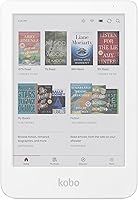
The Scribe's 11-inch display and included pen make it a reading and writing device. The Kobo Libra Colour is a smaller color e-reader built around reading, not handwriting.
That size and pen gap decides the choice more than any single spec.
We compared the specs and features of each device and weighed them against how people actually read and take notes. The comparison below covers screen size, color, note-taking, book access and portability.

Kobo Libra Colour vs Kindle Scribe: the two side by side
The Kindle Scribe is the larger, pen-equipped device; the Kobo Libra Colour is the smaller color reader. Here is how the two differ on the points that matter most.
| Product | Best for | Screen size | Display | Pen | Our score |
|---|---|---|---|---|---|
| Amazon Kindle Scribe Colorsoft 64GB | notes and color reading | 11 in | Color | Included | 9.7 |
| Kindle Colorsoft 16GB | color reading only | 7 in | Color | Not included | 8.5 |
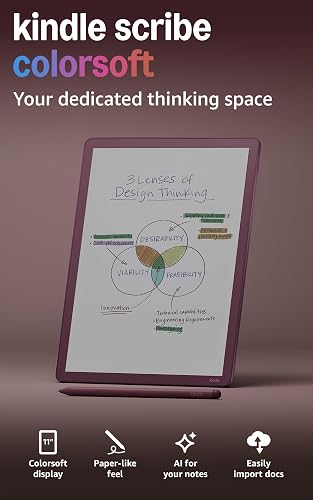
The Scribe Colorsoft carries an 11-inch color display, a pen that never needs charging and a built-in notebook. The Kobo Libra Colour is a 7-inch color e-reader without an included pen.
Both offer color, but they aim at different readers.
The Scribe is also the heavier of the two at 400g and just 5.4mm thin. That size suits a desk or lap, not a jacket pocket.
The Libra Colour's smaller frame is easier to carry for commuters and bedside readers.
The Scribe's built-in notebook is the piece the Libra Colour cannot match. Amazon describes AI tools that find information in your notes, answer questions about what you wrote and generate summaries.
You can also clean up handwriting or convert it to text, and send notebooks to Microsoft OneNote for editing anywhere. For a student or researcher, those are the features that turn a reader into a work device.
Which screen size suits your reading?
Pick the 11-inch Scribe if you read at a desk or want room for notes; pick the smaller Libra Colour for portability. Screen size changes how much text you see and how the device feels in your hands.
The Scribe's 11-inch display gives you a large page for books, documents and notebooks. Amazon says the big screen gives you space to work comfortably.
That matters when you split attention between reading and writing. A page of a PDF or a full notebook spread fits without the cramped feel of a smaller screen.
The Libra Colour's 7-inch screen is closer to a standard e-reader. It shows a page at a time and stays light enough to hold one-handed.
For long reading sessions in bed or on a train, the smaller device is easier to manage.
What the size gap means in practice
An 11-inch page holds noticeably more text than a 7-inch one. On the Scribe you can read a document and jot a margin note without shrinking the page to unreadable text.
On the Libra Colour, a full page of a dense PDF means more zooming and scrolling.
The gap also shows up in the hands. A 7-inch reader balances in one palm, so you can hold a book and a coffee at once.
The Scribe needs two hands or a lap for long sessions. Neither is wrong, but they fit different rooms and different routines.
Think about where you read most. A desk, kitchen table or lap favors the Scribe.
A commute, a crowded couch or a small bag favors the Libra Colour. Our comparison of the Kobo Clara Colour vs Libra Colour covers how the two Kobo sizes differ if you are set on a smaller color reader.
How much does color matter on each device?
Both offer color, but the Scribe's Colorsoft display is built to keep color steady while you write. The Libra Colour brings color to covers and pages on a smaller screen.
The Scribe's Colorsoft display delivers high-contrast, paper-like color without distracting flashes when writing, according to Amazon. That design keeps the page calm during long note sessions.
Color shows up in covers, highlights and notebooks. The pen's shortcut button can call up tools like the highlighter, so you can mark passages in color without digging through menus.
The Libra Colour also shows color covers and pages. Its appeal is color in a smaller, more affordable frame.
If color is your main reason to buy, both deliver it, and the size decides the fit.
Where color actually helps
Color earns its keep on covers, highlighted passages and, on the Scribe, colored pen strokes in notebooks. A reader who mostly reads plain text gets little from it.
A reader who highlights passages in different shades or keeps color-coded notes gets more.
The Scribe's color stays steady while you write, which matters if you mark up a page during a long session. The Libra Colour's color is aimed at reading, so covers and page content look richer on a small screen.
For a buyer who only wants colored book covers, the cheaper small device covers the need.
Our Kobo Libra Colour review looks at whether that color screen is worth it for a reader who mostly wants books. If you are weighing Amazon's two color models, the Kobo Libra Colour vs Kindle Colorsoft comparison puts the Libra Colour against the compact Kindle Colorsoft.
Which device is better for taking notes?
The Kindle Scribe is the clear pick for note-taking. The Kobo Libra Colour has no included pen and is built for reading, while the Scribe ships with a pen and a full notebook system.
The Scribe includes a pen that never needs charging and has a built-in eraser and shortcut button. The textured surface and responsive display create a paper-like writing feel.
You can write in the built-in notebook, then use AI to find information, ask questions about what you wrote and generate summaries.
Handwriting cleanup and text conversion are built in too. You can import files from Google Drive or Microsoft OneDrive, add handwritten notes and markups, and export them as PDFs.
Notebooks can also go to Microsoft OneNote for editing anywhere. That round trip means a marked-up contract or class reading leaves the device as a usable file, not a locked-in note.
Note-taking features the Libra Colour lacks
The Scribe's note tools run from capture to output. You write in the notebook, clean up or convert the handwriting, then send the result to OneNote or export a PDF.
You can also jot notes right on the page while reading. Amazon says text shifts to make room for your writing, and you can expand or collapse margins as needed.
The Libra Colour has no pen in the box and no note-taking system to match. Reading is its job.
If writing is part of why you want a large-screen device, the Scribe is the one to buy.
Which store and book library fits you?
The Kindle Scribe keeps you inside Amazon's store, while the Kobo Libra Colour uses the Kobo store. Your existing library should guide the choice as much as the hardware does.
The Scribe gives you access to the Kindle Store and its millions of titles. If you already buy Kindle books, the Scribe opens them without any conversion.
That alone can settle the choice for a heavy Kindle reader. The Scribe also lists support for popular cloud services, which matters when your reading and notes already live in those accounts.
The Libra Colour is a Kobo device, so it is tied to Kobo's store. If your library lives on Kobo, that is a reason to stay with Kobo.
Getting Kindle titles onto a Kobo takes extra steps, so check what that involves before you switch.
Our guide on whether you can read Kindle books on Kobo walks through the options. If most of your purchases are from Amazon, the Scribe avoids the friction.
Check your library before you buy
Count where your last ten books came from. If most are Kindle purchases or Kindle Unlimited titles, the Scribe is the low-friction pick.
If they came from Kobo or library loans tied to Kobo, the Libra Colour keeps your shelf intact.
A reader with a mixed library has to decide which store to keep and which to work around. Neither device reads the other's store natively.
The Scribe's advantage is that it stays inside the Amazon system you already know, so nothing needs converting on day one.
How do the two compare for reading in the dark?
Both adjust their lighting for low-light reading, but the Scribe's larger screen changes the experience. A warm light setting matters for bedtime reading on either device.
The Scribe's display has a front light and adapts brightness to your lighting conditions. You can adjust the warmth for comfort at night.
The Colorsoft version is built to be easy on the eyes without distracting flashes. The glare-free display also reads well in bright sunlight, so the Scribe covers both ends of the lighting range.
The Libra Colour is a color e-reader with its own front light for reading in the dark. Its smaller screen makes it easier to hold in bed.
For a reader who mainly reads at night in a small space, the Libra Colour's size is a practical advantage.
If you read documents and want a large lit page, the Scribe's 11-inch screen gives you more room. For a bedside book reader, the smaller device is easier to manage with one hand.
Light, size and the bedside test
A bedside reader cares about two things: a dimmable warm light and a device that does not need two hands. The Scribe handles the light side well, with brightness that adapts and warmth you can adjust.
Its size is the weak point when you are lying down.
The Libra Colour's smaller frame wins the bedside test on weight and grip. The front light covers night reading, and the color screen adds little glare in a dark room.
If you read in short bursts before sleep, the lighter device is the one you will reach for.
If you read long documents or take notes at a desk in the evening, the Scribe's larger lit page is the better fit. The light and the size work together for desk work and against it for lying in bed.
Which is easier to carry and hold?
The Kobo Libra Colour is the more portable of the two. The Scribe's 11-inch screen and 400g weight make it a device for a desk or bag, not a pocket.
The Scribe is 5.4mm thin and 400g light for its size. That is impressive for an 11-inch device, but it still takes up more room than a 7-inch reader.
It fits a backpack or tote better than a jacket pocket. The thin frame makes it easy to slide into a laptop sleeve next to a tablet or notebook.
The Libra Colour's 7-inch frame is lighter and easier to hold one-handed. For travel, commuting and reading in bed, that smaller size is the practical pick.
The trade-off is less page space when you read or write.
Carry weight versus page space
The Scribe's 400g is light for an 11-inch device, but it is still more than a small reader. Carry it in a bag and you notice the footprint more than the weight.
Hold it for an hour on a train and the size starts to ask for a second hand.
The Libra Colour is the easier companion for a commute or a coffee shop. It disappears into a small bag and comes out without needing a table.
The cost is page space: fewer words per screen, more page turns and less room for margin notes.
Set your priorities against your daily routine. If the device stays home on a desk, the Scribe's size is an asset.
If it travels with you, the Libra Colour is easier to live with.
Who should buy the Kindle Scribe?
Buy the Scribe if reading and writing share your day. The best fits are students marking up readings, researchers annotating documents and readers who want a large color page with a pen always at hand.
The Scribe earns its place when you would otherwise print documents to mark them up. Import a file from Google Drive or OneDrive, write on it, and export a PDF.
The built-in notebook handles meeting notes and drafts, and the AI tools pull answers and summaries out of what you wrote. A reader who highlights Kindle books in color gets covers and page content in color too.
The 64GB model suits a heavy library and a large stack of imported documents. Its 11-inch screen gives you room for a full document and a margin note at once.
The pen never needs charging, so there is no cable to think about between sessions.
Who should buy the Kobo Libra Colour?
Buy the Libra Colour if you read more than you write and want color in a small frame. It suits commuters, bedside readers and anyone whose library already lives on Kobo.
The Libra Colour's case is portability and a smaller footprint. A 7-inch color screen held in one hand beats an 11-inch device for reading in bed, on a train or in a waiting room.
A reader who only wants colored covers and pages does not need the Scribe's pen, notebook or larger page.
The Kobo store is the other reason to choose it. If your purchases and loans are Kobo-based, staying in that ecosystem avoids conversion work.
The Libra Colour is the simpler device for a reader who just wants to read in color and keep their Kobo library.
Verdict: which should you buy?
Buy the Kindle Scribe if you want to read and write on a big color screen with a pen in the box. Buy the Kobo Libra Colour if you want a smaller color e-reader for books and already use the Kobo store.
The Scribe wins the overall Kobo Libra Colour vs Kindle Scribe decision for most buyers because it does more. The 11-inch Colorsoft display, included pen, built-in notebook and AI tools make it a reading and writing device in one.
Its 9.7 score reflects that range. The document workflow alone sets it apart: import from Google Drive or OneDrive, mark up in handwriting, then export a PDF or send the notebook to OneNote.
The Libra Colour is the better pick for a reader who wants color in a small frame. If you read in bed or on the go and do not need a pen, its smaller size is a real advantage.
Just go in knowing that its store and library differ from Amazon's.
The short version
For notes and document markups, the Scribe. For a large-screen Kindle library, the Scribe.
For a light, portable color reader that stays in the Kobo world, the Libra Colour.
Pick the device that matches your library and your hands. The Scribe asks for desk space and gives back writing tools.
The Libra Colour asks for nothing but a small bag and gives back easy reading. The one that fits your daily routine is the right one to buy.
Frequently asked questions
Is the Kobo Libra Colour bigger than the Kindle Scribe?
No. The Kindle Scribe has an 11-inch display, which is much larger than the 7-inch screen on the Kobo Libra Colour.
The Scribe is the bigger, heavier device, so it suits a desk or lap more than a pocket or small bag.
Can the Kindle Scribe write notes without a subscription?
Yes. The Scribe includes a built-in notebook and a pen that never needs charging, so you can write without a subscription.
AI tools such as summaries and handwriting conversion are part of the built-in notebook features.
Does the Kindle Scribe read in color?
The newest Scribe Colorsoft model has an 11-inch color display for covers, highlights and notebooks. The standard Kindle Scribe 32GB has a black-and-white display, so choose the Colorsoft version if color matters to you.
Which device is better for reading Kindle books?
The Kindle Scribe is the simpler choice for Kindle books because it is made by Amazon and tied to the Kindle Store. Kobo readers use the Kobo store, and getting Kindle titles onto them takes extra steps.
Is the Kobo Libra Colour good for note-taking?
No. The Kobo Libra Colour is a color e-reader without an included pen, so it is built for reading rather than handwriting.
For notes, documents and margin markups, the Kindle Scribe is the better fit.