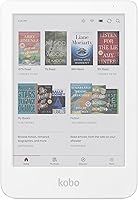
Kobo Libra Colour vs Kindle Paperwhite: Which Is Better? (November 2026)
Pick the Kindle Paperwhite for crisp black-and-white text and the biggest ebook store; pick the Kobo Libra Colour if you want color covers and built-in library borrowing. The Kobo Libra Colour vs Kindle Paperwhite choice really comes down to whether color matters more to you than the Kindle library.
On this page (9 sections)
- Kobo Libra Colour vs Kindle Paperwhite: the quick verdict
- The two side by side
- Color screen or black-and-white text?
- Which ebook store fits your library?
- Which is better for reading in the bath or on the beach?
- Which lasts longer on a charge?
- How do the prices compare?
- Who should buy which?
- The verdict: which should you buy?
Pick the Kindle Paperwhite for crisp black-and-white text and the biggest ebook store; pick the Kobo Libra Colour if you want color covers and built-in library borrowing. The Kobo Libra Colour vs Kindle Paperwhite choice really comes down to whether color matters more to you than the Kindle library.
Both are 7-inch e-readers built for long reading sessions. One gives you a color screen and library loans, the other gives you the largest bookstore and the longest battery claim here.
This comparison covers the display, the store, waterproofing, battery and price tier. Then it names a winner for each kind of reader.


Kobo Libra Colour vs Kindle Paperwhite: the quick verdict
The Kindle Paperwhite is the better e-reader for most people. Its 7-inch glare-free screen is tuned for black-and-white text, and the Kindle Store holds over 15 million titles.
You also get warm light, waterproofing and up to 12 weeks per charge.
The Kobo Libra Colour is the better pick when color is the point. A color screen makes covers and highlights pop, and Kobo's store connects to public library borrowing through OverDrive in many regions.
That matters if you borrow more than you buy.
Neither device is a tablet. Both are single-purpose readers with no social feeds or distracting apps, so the real split is color and store versus text quality and battery.
Our Kobo Libra Colour review goes deeper on the color screen if that feature is pulling you in. For now, here is the short version of each side.
The Paperwhite's case-friendly design and USB-C charging keep it simple. The Libra Colour's color layer is the reason to pay more.
Who wins on color?
The Libra Colour wins outright. Color covers and color highlights are things the Paperwhite cannot do at all.
If you read comics, illustrated guides or travel books, or you just like seeing a shelf of real covers, the color screen earns its keep. For plain novels, the difference fades fast.
Who wins on text and battery?
The Paperwhite wins. Its display is optimized for black-and-white reading, with a higher contrast ratio than earlier Paperwhites and 25% faster page turns, according to Amazon.
It also claims up to 12 weeks per charge. That is the longest figure in this comparison and the strongest reason to pick it for pure novel reading.
The two side by side
They match on screen size and waterproofing, and split on display type and battery. The table below lines up the facts that decide the purchase.
| Feature | Kindle Paperwhite | Kobo Libra Colour |
|---|---|---|
| Screen | 7-inch glare-free, black and white | 7-inch color E Ink |
| Color covers and highlights | No | Yes |
| Warm light | Yes | Yes |
| Waterproof | Yes | Yes |
| Battery claim | Up to 12 weeks | Not published here |
| Store | Kindle Store, 15 million+ titles | Kobo Store plus library loans |
| Stylus support | No | Yes, sold separately |
| Price tier | Mid-range | Premium |
The two devices are close in size and both handle reading in the bath or by the pool. The real gaps are the color layer, the store ecosystem and the battery claim.
That last row matters more than the spec sheet suggests. Your existing library decides how much friction you face on day one.
Color screen or black-and-white text?
Choose color if covers and highlights are part of the reading experience for you; choose black and white if text is all you need. The Kindle Paperwhite's screen is optimized for crisp black-and-white reading.
The Libra Colour adds a color layer on top of E Ink.
Color E Ink works by filtering light through a color layer, so the display can look slightly softer than a pure black-and-white panel. That is the trade you accept for seeing covers and highlighting in yellow, orange, blue and pink.
If most of your library is novels, the color layer adds little. A black-and-white screen gives you the sharpest text for the money.
If you read comics, cookbooks or travel guides, the Libra Colour's screen shows images in color. That is the single biggest reason people pick it over a Paperwhite.
Our Kobo Clara Colour vs Libra Colour comparison helps if you like the color idea but want to weigh screen size too.
When color pays off
Color earns its place when images carry information. Maps, charts, comic panels and photo-heavy guides all read better in color.
It also helps if you annotate. The Libra Colour supports a stylus sold separately, so you can mark up pages and take notes in color.
When black and white is enough
Black and white is enough for novels, essays, history and most nonfiction. Text is the whole experience, and the Paperwhite renders it with high contrast.
You also save money in most cases. Color screens sit in a higher price tier, and that premium buys you covers and highlights, not sharper words.
Which ebook store fits your library?
The Kindle Store is the larger ecosystem; Kobo leans on library borrowing and open formats. Pick the store your books already live in.
Amazon says the Kindle Store holds over 15 million titles, and a Kindle Unlimited subscription adds all-you-can-read access. If you already buy Kindle books, the Paperwhite opens them with no conversion step.
Kobo's store is smaller but supports public library loans through OverDrive in many countries. That is a real advantage if you read mostly borrowed books and want to skip per-title purchases.
Kobo also reads EPUB files, so you can load books from other stores or DRM-free sources. Kindle prefers its own formats, though Amazon offers send-to-Kindle tools for personal documents.
If you are unsure whether your Kindle library will follow you to a Kobo, read can you read Kindle books on Kobo first. The short answer is that it takes work, and most readers are better off staying in one ecosystem.
Library borrowers lean Kobo
The Libra Colour's built-in OverDrive access is the feature Kindle users ask about most. It lets you borrow library ebooks and read them on the device without a separate app.
Availability varies by library and region. Check your local library's catalog before you commit to the color screen for this reason alone.
Kindle buyers lean Paperwhite
If your purchases sit in the Kindle Store, the Paperwhite is the natural fit. Your books appear without conversion, and Kindle Unlimited works as expected.
The Paperwhite also has the edge in battery life for heavy readers. Long sessions between charges suit people who read for hours each day.
Which is better for reading in the bath or on the beach?
Both are built for reading near water, so neither wins this one. The Paperwhite is waterproof and the Libra Colour is designed to shrug off splashes.
Waterproofing matters if you read in the bath, by the pool or on the beach. A wet hand or a splash is the main risk for an e-reader, and both devices are built to handle it.
The Paperwhite's warm light adjusts from white to amber for reading in the dark. The Libra Colour has warm light as well, so late-night reading is comfortable on either.
If you read in bright sun, both screens stay glare-free. Color on the Libra Colour can look more muted in direct sunlight than indoors.
Warm light and dark mode
The Paperwhite's adjustable warm light shifts from white to amber. That reduces blue light for night reading and is easy to set.
The Kindle Colorsoft adds Dark Mode for low light. The Paperwhite relies on its warm light setting instead.
The Libra Colour also offers warm light for evening sessions.
Which lasts longer on a charge?
The Kindle Paperwhite wins on battery life, with up to 12 weeks on a single charge. The Libra Colour's battery figure is not published here, so the Paperwhite is the safer pick for heavy readers.
Amazon's 12-week claim assumes light wireless use and modest brightness. Real-world life drops with front light at full and Wi-Fi left on.
Still, that is a long gap between charges.
The Kindle Colorsoft claims up to 8 weeks, which shows how the color layer affects battery. Color screens draw more power, so a color e-reader generally needs charging more often.
If you read an hour a night, the Paperwhite can go weeks between charges. A color device will ask for the cable sooner.
Both charge over USB-C. That means one cable for your phone and your e-reader, which keeps travel simple.
Charging habits that help either device
Charge before the battery runs flat when you can. Deep discharges shorten battery life over time.
Turn off Wi-Fi when you are not downloading books. Background syncing is a steady drain on either device.
Lower the front light at night. Brightness is the biggest battery variable after wireless use.
How do the prices compare?
The Kindle Paperwhite sits in the mid-range; the Kobo Libra Colour sits in the premium tier. Color and stylus support are what push the Kobo up.
The Paperwhite's price buys a 7-inch glare-free screen, warm light, waterproofing and up to 12 weeks of battery. For most readers, that is the whole package.
The Libra Colour's premium covers the color layer and stylus support. A stylus is sold separately, so budget for it if you plan to annotate.
If color is a nice-to-have rather than a need, the Paperwhite is the better use of money. Put the savings toward books or a subscription.
If color is the reason you are shopping, the Libra Colour is the only device here that delivers it. Our Kobo Libra Colour vs Kindle Colorsoft comparison covers the color-on-color matchup.
Which is better value?
The Paperwhite is the better value for pure reading. It costs less and covers everything a novel reader needs.
The Libra Colour is better value only if you use color and the stylus. Otherwise you pay a premium for features you will not touch.
Who should buy which?
Buy the Kindle Paperwhite if you read mostly novels and buy from Amazon; buy the Kobo Libra Colour if color or library loans drive your reading. Here is the split in plain terms.
Pick the Paperwhite if your library is already in the Kindle Store. It opens your books without conversion and lasts up to 12 weeks per charge.
It is also the cheaper of the two in most cases.
Pick the Libra Colour if you read comics, illustrated guides or library books. The color screen makes covers and images worth seeing, and OverDrive support means you can borrow instead of buy.
Skip the Libra Colour if you mostly read plain text. You would pay a premium for a color layer you rarely notice.
The Paperwhite's sharper text and longer battery are the better match.
Skip the Paperwhite if color covers are the thing you want most. No software update will add color to a black-and-white screen.
The reader who should wait
If you are unsure about color, borrow or try one before buying. Color E Ink is different from an LCD tablet, and some readers prefer the crisp black-and-white look.
If you read only a few books a year, either device is more than enough. Pick by store and price rather than by screen type.
The verdict: which should you buy?
Buy the Kindle Paperwhite for most people: it wins on text quality, battery life and store size. Its 7-inch glare-free screen, warm light and waterproofing cover everything a novel reader needs, and the Kindle Store makes finding books easy.
Buy the Kobo Libra Colour if color covers, color highlights or library borrowing are must-haves. It is the right device for comics, illustrated books and readers who borrow more than they buy.
The simple decision rule: pick the Paperwhite for words, pick the Libra Colour for color. Neither is a bad e-reader, but each fits a different reader.
If you are still weighing color options, our Kobo Libra Colour vs Kindle Colorsoft comparison puts the two color screens head to head. For most readers, though, the Paperwhite remains the safe, well-rounded buy.
Frequently asked questions
Is the Kobo Libra Colour better than the Kindle Paperwhite?
It depends on what you read. The Libra Colour adds color for covers and highlights plus built-in library borrowing, while the Paperwhite gives you crisp black-and-white text and the larger Kindle Store.
Pick color and library loans for the Kobo, or the Kindle library for the Paperwhite.
Can the Kindle Paperwhite show color book covers?
No. The Paperwhite's display is built for black-and-white reading, so covers and illustrations appear in grayscale.
If color covers and color highlights matter to you, the Kindle Colorsoft is the closest Kindle option.
Is the Kobo Libra Colour waterproof?
The Libra Colour is designed for reading near water, so you can take it to the pool or bath. Check the model's own documentation for the exact water-resistance rating before you rely on it around water.
Which e-reader has better battery life, Kobo Libra Colour or Kindle Paperwhite?
The Kindle Paperwhite has the longer claim here, up to 12 weeks on a single charge. The Kindle Colorsoft claims up to 8 weeks.
Battery life varies with brightness, wireless use and how much you read.
Can I read Kindle books on the Kobo Libra Colour?
Not directly. Kindle books are tied to Amazon's ecosystem, so the Libra Colour is built around the Kobo Store.
If your library is mostly Kindle purchases, the Paperwhite is the simpler fit.