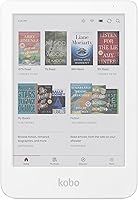
Kobo Clara Colour vs Kindle: Which to Buy? (November 2026)
Pick the Kindle Paperwhite 16GB for most readers, because it gives you the sharpest 7-inch glare-free screen and the widest bookstore in this Kobo Clara Colour vs Kindle matchup. Choose a Kindle Colorsoft 16GB when color covers and color highlights matter more than price, and look at Kobo only if your library lives outside Amazon.
On this page (7 sections)
- Kobo Clara Colour vs Kindle: which one should you buy?
- How do the two Kindle screens compare for everyday reading?
- Which store and library fit your reading?
- How do screen size and portability differ?
- Which Kindle should you choose?
- Who should buy which?
- Verdict: which e-reader wins the Kobo Clara Colour vs Kindle decision?
Pick the Kindle Paperwhite 16GB for most readers, because it gives you the sharpest 7-inch glare-free screen and the widest bookstore in this Kobo Clara Colour vs Kindle matchup. Choose the Kindle Colorsoft 16GB when color covers and color highlights matter more than price.
The Kobo Clara Colour sits on the other side of this choice with a 6-inch color screen. This comparison looks at what each screen shows, which store you buy from and how the sizes affect daily reading.
The winner for most people is the Paperwhite. It costs less than the color options and gives you more reading time per charge.
Color is a want, not a need, for most readers.


Kobo Clara Colour vs Kindle: which one should you buy?
The Kindle Paperwhite wins for most buyers because its 7-inch screen, 12-week battery and Amazon library cover the average reader's needs. Pick a color Kindle only when color covers and color highlights genuinely improve what you read.
The Kobo Clara Colour offers a 6-inch color screen and access to Kobo's store. That matters if your books already live in Kobo's library or you borrow heavily from a library system that supports Kobo.
For everyone else, the Amazon side is simpler. The Kindle Store has over 15 million titles, and Kindle Unlimited adds an all-you-can-read option that includes best sellers.
Screen size is the other deciding point. The Paperwhite's 7-inch display has more room for text than a 6-inch screen, so you turn fewer pages and fit more words on each one.
There is also a middle path inside the Kindle line. The Paperwhite Signature Edition 32GB keeps the same 7-inch screen and 12-week battery but adds an auto-adjusting front light and wireless charging.
That matters if you read through changing light and would rather drop the device on a dock than plug in a cable.
| Product | Best for | Our score |
|---|---|---|
| Kindle Paperwhite 16GB | most readers | 9.2 |
| Kindle Colorsoft 16GB | color covers | 8.5 |
How do the two Kindle screens compare for everyday reading?
The Kindle Paperwhite screen is built for black and white text, while the Kindle Colorsoft screen is built for color. The maker describes the two displays as tuned for different jobs, so the choice starts with what you read.
The Paperwhite's next-generation 7-inch display has a higher contrast ratio and 25% faster page turns than earlier Paperwhites. That makes plain text look crisp and keeps page flips quick.
The Colorsoft's 7-inch color display is optimized for reading in color. It shows covers in their real colors and lets you highlight passages in yellow, orange, blue and pink.
Both screens adjust from white to amber for bright sunlight or dark rooms. Both are also waterproof, so neither rules out a bath or a poolside afternoon.
If you read novels, essays and history, the Paperwhite screen is the better fit. Color becomes worthwhile for comics, illustrated guides, cookbooks and travel books.
Is a color screen worth it for novels?
For most novels, no. A color screen adds cover artwork and colored highlights, but the words look softer than they do on a dedicated black and white display.
The Paperwhite's faster page turns matter more when you read long stretches. A novel rarely needs color, so the color Kindle's shorter 8-week battery is a real cost with little return.
The contrast gap shows up most in long paragraphs. Text tuned for black and white stays sharper at small type sizes, which is where the Paperwhite pulls ahead for people who read for hours.
When does color change the experience?
Color pays off when the content itself is colored. Maps in fantasy books, charts in nonfiction and picture-heavy guides all lose meaning in grayscale.
The Colorsoft also lets you highlight in four shades, which helps when you mark passages for study or reference. That is a reading workflow a black and white screen can't match.
Dark Mode on the Colorsoft keeps highlights and pen strokes in color while the background goes black and the text goes white. So a late-night session keeps your colored marks visible instead of flattening everything to gray.
Our Kobo Libra Colour review covers how a larger color screen feels for this kind of reading. It helps you judge whether color is a gimmick or a real upgrade.
Which store and library fit your reading?
The Kindle Store is bigger and its subscription catalog is deeper, so Amazon wins on sheer selection. Kobo makes more sense when your library is already built there.
Amazon says its store holds over 15 million titles. Kindle Unlimited adds access to a large catalog that includes best sellers, so heavy readers can spread a subscription across many books.
Kobo's store is smaller. Its advantage is regional reach and a long history in markets outside the US, where local ebook catalogs can be stronger than Amazon's.
Books don't move between the two stores. A title bought on Amazon won't appear on a Kobo Clara Colour, and a Kobo purchase won't sync to a Kindle.
Our explainer on whether you can read Kindle books on a Kobo walks through the workarounds and their limits.
Decide where you'll buy most of your books before you buy the device. Switching stores later means leaving a library behind.
Amazon Prime and Kindle Unlimited readers
If you already use Amazon for shopping, the Kindle fits the same account. Your books, wish lists and subscription all sit in one place, and the device arrives ready to sign in.
Kindle Unlimited is the stronger draw for readers who finish several books a month. The catalog includes best sellers, so the subscription does real work rather than sitting unused.
That one-account setup also means fewer decisions. You buy, borrow and read in one place instead of juggling a second store login on a second device.
Kobo buyers with an existing library
Pick Kobo when you have years of purchases in its store. Rebuilding that library on Amazon is expensive and often impossible for older or regional titles.
Kobo also suits readers who prefer to keep their buying away from Amazon. That is a values choice, and it's a legitimate reason to accept a smaller store.
If neither store is yours yet, start with Amazon. It is the easier place to build a first library and the easier place to keep one as you upgrade devices later.
How do screen size and portability differ?
The two Kindle models use 7-inch screens, which give you more text per page than the Kobo Clara Colour's 6-inch display. Bigger isn't always better, though, because a smaller device slips into more bags.
The Paperwhite and the Colorsoft share the same ultra-thin design and glare-free 7-inch screen. That extra inch means fewer page turns and a more book-like layout for dense text.
A 6-inch screen suits readers who carry their e-reader in a coat pocket or a small bag. It also feels lighter in one hand over a long reading session.
Think about where you actually read. If it's a commute with a packed bag, the smaller Kobo has an edge.
If it's an armchair or a bedside table, the 7-inch Kindles give you a better page.
Weight and one-handed reading
Weight matters more than screen size when you hold a device for an hour. The Paperwhite is described as ultra-thin for travel, but a smaller device is easier to balance in one hand.
If you read standing on a train, try the smaller option first. A 7-inch screen is lovely on a sofa and less lovely when your wrist is doing the work.
Charging and travel
Travel also comes down to how often you hunt for a charger. The Paperwhite and Signature Edition both run up to 12 weeks on a single USB-C charge, while the Colorsoft runs up to 8 weeks.
The base Kindle sits at up to 6 weeks.
A longer gap between charges matters most on trips where outlets are scarce. If you read on planes and in hotel rooms for a couple of weeks, the 12-week figure is the one to plan around.
If you are still weighing sizes, our Kobo Clara Colour vs Libra Colour comparison covers the step up to a larger color screen.
Which Kindle should you choose?
The Kindle Paperwhite 16GB is the right Kindle for most people, because it pairs the best screen with the longest battery and the full Amazon library. The Colorsoft is the pick when color is the point.
The Paperwhite's 16GB storage holds thousands of books. That's plenty for a personal library, and it keeps the price lower than the color model.
Its 12-week battery means charging is an afterthought. You can leave the charger at home on a two-week trip and still read every evening.
The Colorsoft's 8-week battery is still generous, but you'll charge it more often. In exchange you get covers in color, colored highlights and a display tuned for illustrated content.
Both Kindles share the same distraction-free design, with no social media, notifications or other apps pulling you away from the page. Waterproofing on both means a spilled drink or a rainy commute is not a disaster.
Is the Paperwhite Signature Edition worth a look?
The Kindle Paperwhite Signature Edition 32GB adds an auto-adjusting front light, wireless charging and double the storage. It shares the same 7-inch screen and 12-week battery as the standard Paperwhite.
That auto-adjusting light is handy if you read in changing light through the day. Wireless charging keeps a charging dock on your nightstand instead of a cable.
Note that the dock is sold separately, so factor that in if the cable-free setup is the reason you're stepping up.
It is a step up in convenience, not in reading quality. If you want the best text screen and don't care about wireless charging, the standard Paperwhite is the smarter buy.
What about the base Kindle?
The Kindle 16GB uses a 6-inch glare-free display with a front light that is 25% brighter at its maximum setting. It offers up to 6 weeks of battery life and the same Kindle Store access.
It is the budget route into Amazon's library. You give up the 7-inch screen and the longer battery, but you keep the books, the store and the distraction-free reading experience.
It also uses 75% recycled plastics and 90% recycled magnesium, with fully recyclable packaging.
If size and battery matter more than saving money, stay with the Paperwhite. If you want the lowest entry into Kindle reading, the base model does the job.
Our Kobo Clara BW vs Kindle Paperwhite comparison covers the black and white Kobo option if you're still deciding between brands.
Who should buy which?
Buy the Kindle Paperwhite if you read mostly text, want the longest battery and buy books from Amazon. Buy a color Kindle if covers and highlighted passages need color, and buy Kobo if your library already lives there.
Here's the simple split:
- Most readers: Kindle Paperwhite 16GB. Best screen for text, longest battery, widest store.
- Color fans and comic readers: Kindle Colorsoft 16GB. Color covers, four highlight shades and a waterproof color screen.
- Convenience buyers: Kindle Paperwhite Signature Edition 32GB. Auto-adjusting light, wireless charging and more storage.
- Budget first-timers: Kindle 16GB. A 6-inch screen and Amazon's full library at the lowest cost.
- Kobo loyalists: Kobo Clara Colour. A 6-inch color screen that keeps your existing Kobo purchases.
The Kindle side wins this comparison for most people. The Kobo Clara Colour is a good device for a reader who is already committed to Kobo's store or who wants a smaller color screen.
Don't buy a Kobo Clara Colour hoping to read Amazon books on it. That path is blocked, and the workarounds are more trouble than most readers want.
Verdict: which e-reader wins the Kobo Clara Colour vs Kindle decision?
The Kindle Paperwhite 16GB wins this Kobo Clara Colour vs Kindle comparison for most readers. It gives you the sharpest text screen, the longest battery and the largest bookstore in one device.
The Kobo Clara Colour is the right answer for one clear group: readers with an established Kobo library or a strong reason to avoid Amazon. For them, the smaller 6-inch color screen and Kobo's store are the whole point.
If you want color on the Kindle side, the Colorsoft is the pick. It brings covers and highlights to life and stays waterproof, at the cost of a shorter battery.
Its Dark Mode keeps those colored highlights intact in low light.
If you want color plus the longest battery, look at the Signature Edition instead. It keeps the 12-week figure and the 7-inch screen and adds the auto light and wireless charging.
Start with the Paperwhite unless color or Kobo loyalty clearly applies to you. Then check the exact model's storage and screen details on the product page before you order, so you know what's in the box.
Frequently asked questions
Can the Kobo Clara Colour read Amazon Kindle books?
Not natively. Kobo's store and Amazon's store are separate, so books bought on Amazon don't sync to a Kobo Clara Colour.
Plan your library around one store, or expect to buy titles twice.
Is a color e-reader screen worse for reading plain text?
It can look softer than a black and white screen. The Kindle Colorsoft's color display is built for color covers and color highlights, while the Paperwhite screen is tuned for crisp black and white text.
Do either of these e-readers need a subscription?
No. Both work with bought books alone.
Amazon also offers Kindle Unlimited as an optional subscription, and Kobo has its own subscription service, but neither is required to read.
Which e-reader has the longer battery life?
The Kindle Paperwhite. Amazon says a single USB-C charge lasts up to 12 weeks, compared with up to 8 weeks for the Kindle Colorsoft.
Your own reading light, brightness and wireless settings change the real figure.