Kindle Scribe vs Boox: Which to Buy? (November 2026)
The Kindle Scribe Colorsoft is the better buy for most people who want one device for color notes and Kindle reading. Pick a Boox tablet only if you need open Android access and file sharing across many cloud services.
On this page (8 sections)
- Which is better for writing notes?
- Which one reads Kindle books better?
- How do document imports and cloud services compare?
- Which is easier to carry and use all day?
- Where does a Boox tablet make more sense?
- Does the pen or battery change the decision?
- Who should buy which?
- The verdict: which should you buy?
The Kindle Scribe Colorsoft is the better buy for most readers who also write. In this kindle scribe vs boox comparison, the Scribe's color writing layer and Kindle library make it the simpler choice for a single-device workflow.
Boox tablets win on open access. The Scribe wins on focus.
Most people who buy a note tablet want one thing that reads well and writes well, and the Scribe does both without app distractions.
The comparison below covers display, pen feel, reading, file sharing and battery. Each point ends with a clear winner for a specific kind of buyer.
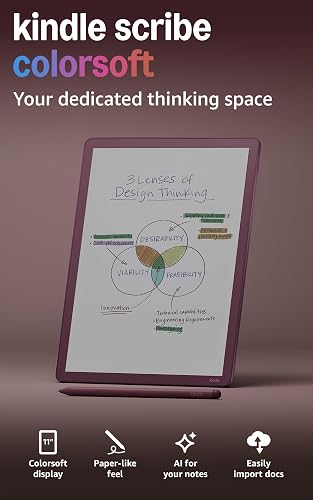 Best for color notes and Kindle reading
Amazon Kindle Scribe Colorsoft 64GB

Which is better for writing notes?
The Kindle Scribe Colorsoft is the better writing device for most people because the pen needs no charging and the color display works without distracting flashes. The Scribe's textured surface gives a smooth, paper-like feel under the included pen.
The pen has a built-in eraser and a shortcut button for tools like the highlighter. That's a real workflow advantage: no cable, no pairing, no dead stylus in the middle of a page.
You pick it up and write, whether it sat in a bag for a day or a month.
The 11-inch display gives you space to work. At 5.4mm thin and 400g light, it's comfortable to hold for a long session.
The Scribe 32GB adds faster writing and page turns, which matters when you write a lot.
The standard Scribe 32GB has the same 11-inch paper-like display without color. If your notes are text and sketches in black and white, it's the more direct pick.
A Boox tablet has its own pen feel and app-based note taking. For someone who wants a notebook first, the Scribe's built-in notebook keeps the experience simple.
Our Kindle Scribe review covers how that notebook handles day-to-day writing.
Where the color Scribe pulls ahead
The Colorsoft display delivers high-contrast, paper-like color that's easy on the eyes. It does this without distracting flashes when writing, so writing stays smooth.
Color matters when you highlight, color-code subjects or sketch diagrams you want to read at a glance. A color-coded schedule or a labeled sketch stays legible at a glance in a way that shading never quite does.
The Scribe 32GB is fine for plain notes. But if you plan to mark up study material or design work in color, the Colorsoft model is the reason to spend more.
The color layer is also what carries over to reading, where highlights and margin notes keep their tint.
How the writing surface feels over time
The textured surface is the part you notice every session. A glossy tablet makes the pen skate, and glass under a stylus gets tiring.
The Scribe's surface adds just enough resistance to keep your handwriting steady.
That feel matters more than a single speed number when you fill pages. A faster display helps page turns and quick strokes, but the texture is what makes a long writing session comfortable.
Both Scribe models share that surface, so the color question is the main split between them.
Which one reads Kindle books better?
The Scribe is the better reader for Kindle owners because Kindle books and your handwritten notes sit in one place. You can choose from millions of titles in the Kindle Store and jot notes right on the page.
Writing between the lines works as text shifts to make room. You can expand and collapse margins when you need more space.
That's a reading workflow a general E Ink tablet can't match as directly.
Both Scribe models have a glare-free display that stays easy on the eyes in bright sunlight. The 32GB version auto-adjusts brightness to your lighting and lets you warm the display at night.
If you already buy Kindle books, the Scribe becomes a reader and a notebook in one device. That's the core argument in this kindle scribe vs boox matchup.
There's no second library to manage and no separate app to install.
What the Scribe's focus means
The Scribe is purpose-built for reading and writing. It stays away from distracting apps and notifications.
For a student or a heavy reader, that focus is the point.
A Boox tablet gives you more choices. If your reading lives in apps like Libby, or your PDFs arrive through a third-party service, that flexibility can matter.
For most Kindle buyers, though, the Scribe's closed ecosystem is the easier path.
One more reading detail: on the Scribe, a note you take while reading stays attached to that page. Reopening the book brings the note back in context, so margin thoughts don't get lost in a separate notebook.
How do document imports and cloud services compare?
The Scribe handles documents well if your files live in Google Drive or Microsoft OneDrive. It imports files from either, lets you add handwritten notes and markups, and exports them as PDFs.
You can also send notebooks to Microsoft OneNote to edit anywhere. For a work or study setup built around Google or Microsoft, that's a clean bridge between handwriting and a computer.
The Scribe's AI tools add another layer. You can find information in your notes, ask questions about what you've written and generate summaries.
You can clean up handwriting or convert it to text. That last one is the practical bridge for anyone who needs typed notes from a handwritten page.
Boox tablets generally run on Android with access to more third-party apps. If you need to sync with several services outside Google and Microsoft, a Boox device can fit more workflows.
The Scribe keeps sharing to the services Amazon supports.
Who feels the difference
A student who writes notes and wants them in OneNote gets a smooth path on the Scribe. An office worker who already uses Google Drive for everything finds imports and PDF exports quick.
The round trip matters: mark up a file by hand, then send it back as a PDF the team can open.
A freelancer who syncs with several niche cloud tools may find the Scribe limited. That's the buyer where a Boox tablet earns its place.
Which is easier to carry and use all day?
Both Scribe models are close to a hardcover notebook in size and weight, so carrying one is simple. The 11-inch display measures just 5.4mm thin and weighs 400g.
That size gives you room to write comfortably without a cramped page. It's larger than many compact E Ink tablets, but light enough to hold for a long session.
The Scribe's long battery life gives you weeks of reading and writing on a single charge. You can leave the charger behind on a trip or a long day of lectures.
The Scribe 32GB adds a front light that adapts brightness automatically. You can adjust the warmth for comfort at night.
The Colorsoft model has its own front light too.
If you carry a bag all day, a tablet this size still needs a protective case. That adds a little weight and bulk, and it's the same for either Scribe model.
The pen's lack of charging also means no extra cable in the bag.
A note on reading in bright light
Both Scribe models use a glare-free display that stays readable in bright sunlight. The color model adds a front light over its color layer.
The black-and-white model's auto-brightness keeps the page comfortable in changing light.
The Colorsoft front light also means color stays readable indoors and out. Its paper-like layer is tuned to keep contrast high without the washes that can make a color screen look pale.
For anyone who reads outdoors, that combination matters more than raw color saturation.
Where does a Boox tablet make more sense?
A Boox tablet makes sense for people who need open app access and multi-service sync. It's a different buyer from the Kindle-first reader who wants one focused device.
If your note taking depends on an app that isn't Amazon's, a Boox device can run it. That's the honest reason to choose one.
For everyone else, the Scribe's closed system is a feature, not a limit.
Our reMarkable vs Boox comparison looks at the same open-ecosystem question from another angle. If your main goal is a distraction-free writing tablet, that piece helps you weigh the alternatives.
Who should skip the Scribe
Skip the Scribe if your workflow runs on third-party Android apps or you need to sync with many services. Skip the Scribe 32GB if color marking matters to you, and go to the Colorsoft model instead.
It's also worth skipping the Scribe if your documents live outside Google Drive and OneDrive. The Scribe's sharing path is built around those two services, OneNote and PDF export.
If your team's files sit somewhere else, a Boox tablet fits without workarounds.
Does the pen or battery change the decision?
No, the pen and battery favor the Scribe and don't change the overall winner. The included pen never needs charging on either Scribe model, and the built-in eraser and shortcut button come with it.
Weeks of reading and writing on a single charge is the battery story. A Boox tablet's battery life depends on the apps you run and the refresh modes you choose.
For a student or a meeting-heavy worker, a pen that's always ready is a small but daily benefit. You don't think about charging a stylus before a lecture or a note-taking session.
Battery life also shapes how you use the device. With weeks between charges, the Scribe suits a bag, a bedside table or a desk drawer without a cable nearby.
The pen's eraser and shortcut button sit in reach too, so highlighting and fixing a mistake are one press away.
What the Scribe 32GB gives up
The 32GB model drops the color layer. It keeps the fast writing, the auto-brightness and the pen.
If you want a black-and-white notebook and reader at a lower tier, it's a solid choice.
It also keeps the same storage class as the 32GB name suggests. The Colorsoft model carries 64GB for the extra room its color notes and reading take up.
If you save many marked-up documents and notebooks, the larger storage on the Colorsoft is the more comfortable fit.
Who should buy which?
Buy the Kindle Scribe Colorsoft if you want color notes and Kindle reading in one device. It's the higher-scored model and the best overall pick in this kindle scribe vs boox matchup for most readers.
Buy the Kindle Scribe 32GB if your notes are text and sketches and you don't need color. It's the classic black-and-white writing tablet with the same 11-inch surface.
Choose a Boox tablet only if open Android access and multi-service sync are requirements. If those aren't must-haves, the Scribe's focus and Kindle library make it the easier daily device.
If you're also weighing a smaller Kindle for reading, our Paperwhite vs Signature Edition comparison covers the reading-only side. And if a compact Boox tablet tempts you, our Boox Palma vs Kindle comparison checks whether the smaller size is worth it.
The verdict: which should you buy?
Buy the Kindle Scribe Colorsoft for the best overall experience, and the Scribe 32GB if you don't need color. In this kindle scribe vs boox decision, the Scribe models win for most buyers because writing and Kindle reading come in one focused device.
The Boox path only wins when open apps and multi-service sync are hard requirements. For a student, a reader or anyone who wants a notebook that also reads, the Scribe is the cleaner answer.
Our score weighs specs, features and buyer feedback against what you're shopping for. On that basis, the Colorsoft leads, the Scribe 32GB follows as the black-and-white pick, and a Boox tablet is the specialist choice for open access.
Start with the writing surface. If color helps you think, choose the Colorsoft.
If plain notes are enough, choose the Scribe 32GB. If neither fits your workflow, a Boox tablet is the alternative to check.
Frequently asked questions
Is the Kindle Scribe or Boox better for note taking?
The Kindle Scribe is better for most people who want a simple writing tablet with an included pen and Kindle books built in. A Boox tablet is worth considering only if you need open access to many third-party apps and cloud services.
Does the Kindle Scribe pen need charging?
No. The included pen on both Scribe models never needs charging and has a built-in eraser and shortcut button.
That means you can pick it up after a long gap and write straight away.
Can the Kindle Scribe handle color writing?
The Kindle Scribe Colorsoft model has an 11-inch color display for writing in color without flashes. The standard Scribe 32GB has a black-and-white glare-free display.
Which device is easier to carry?
Both Scribe models are 5.4mm thin and weigh 400g, so they feel similar in a bag. Carry weight depends on the case you choose as much as the tablet.
Can the Kindle Scribe import documents?
Yes. It imports files from Google Drive or Microsoft OneDrive, lets you add handwritten notes and markups, and exports them as PDFs.
You can also send notebooks to Microsoft OneNote.