Boox Note Max vs reMarkable Paper Pro: Which to Buy? (November 2026)
Pick the reMarkable Paper Pro for color writing and reading; pick a Boox Note Max if you want an Android-style tablet you can load with apps. For most people who buy a paper tablet to think and write without distractions, the Paper Pro's 11.8-inch color display and included Marker Plus make it the better buy.
On this page (9 sections)
- The quick verdict: Paper Pro for writing, Boox for flexibility
- Screen size and display: 11.8 inches vs 13.3 inches
- The pen and writing feel: included Marker Plus vs the Boox stylus
- Storage and files: 64 GB vs model-dependent Boox storage
- Reading and focus: one device for books and another for apps
- Price, accessories and what's in the box
- Who should buy the reMarkable Paper Pro?
- Who should buy a Boox Note Max?
- Verdict: which paper tablet should you buy?
Pick the reMarkable Paper Pro for color writing and reading; pick a Boox Note Max if you want an Android-style tablet you can load with apps. For most people who buy a paper tablet to think and write without distractions, the Paper Pro's 11.8-inch color display and included Marker Plus make it the better buy.
The boox note max vs remarkable paper pro question comes down to one split: do you want a focused writing tool or a flexible tablet? The Paper Pro commits to the first, and its color screen plus pen are the reasons it earns the higher overall score here.
This comparison looks at screen size, the pen, storage, reading and the accessories you'll want. We compared the published specs and features of both tablets rather than testing them ourselves.
 Best for protecting the Paper Pro
CoBak Case for Remarkable Paper Pro Color
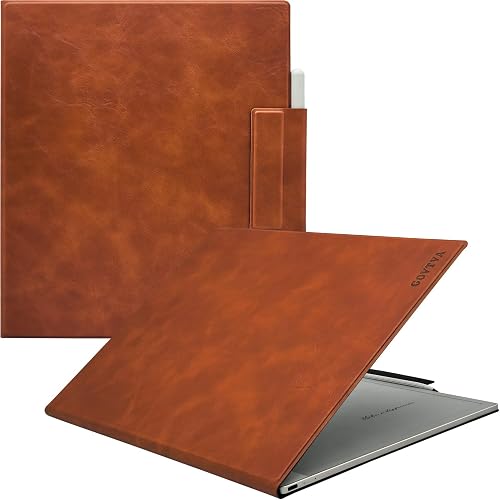 Best for carrying the Boox Note Max
GOVTVA Magnetic Case for Onyx Boox Tablet
The quick verdict: Paper Pro for writing, Boox for flexibility
The reMarkable Paper Pro wins for most readers because it does color writing and reading without apps to distract you. Its 11.8-inch Canvas Color display, included Marker Plus pen and 64 GB of storage cover the core job of a paper tablet.
The Boox Note Max is the better pick when you want a large 13.3-inch screen and the freedom to run apps. That Android flexibility is its main advantage, but it also means more setup and more ways to drift away from your notes.
The overall winner is the Paper Pro for one simple reason: it ships as a complete writing kit. You get the tablet, the pen with a built-in eraser and 6 spare tips in the box.
With a Boox tablet, the pen experience and the software load are things you sort out as you go.
That difference matters most if you're buying a tablet to write, sketch or mark up PDFs. If you mainly want a tablet for reading and light notes across many apps, the Boox case gets stronger.
Our reMarkable Paper Pro review covers the writing feel and the color screen in more depth if you want to look closer at that side.
Screen size and display: 11.8 inches vs 13.3 inches
The Paper Pro gives you a color screen at 11.8 inches; the Boox Note Max gives you a bigger 13.3-inch canvas. Which one is better depends on whether you want color or room to spread out.
The Paper Pro's display is 2160 x 1620 pixels with a 4:3 aspect ratio. The color layer means sketches, highlights and annotations show in muted, natural tones rather than bright pixel colors.
A 13.3-inch Boox screen is noticeably larger. That extra space helps with full-page PDFs, wide spreads and side-by-side reading, and it's the reason many students and researchers lean toward the bigger tablet.
The trade-off is portability. A 13.3-inch tablet is a desk and bag device, not something you slip into a small purse.
The Paper Pro's 11.8-inch body is easier to carry around and still gives you a full-size page.
Color matters for some work and not others
Color on the Paper Pro helps when you highlight readings in different colors, sketch diagrams or review annotated documents. Colors appear natural and muted because the display moves colored particles rather than glowing pixels.
If your work is mostly black text and handwriting, the color layer is a nice extra rather than a deciding factor. In that case, screen size and the writing feel become the bigger considerations.
Ghosting is normal on E Ink displays and clears on refresh. Don't treat a faint leftover image as a fault; it's how the screen technology works.
The pen and writing feel: included Marker Plus vs the Boox stylus
The Paper Pro's Marker Plus comes in the box and pairs with the color display for realistic friction; a Boox stylus is a separate choice. This is the clearest practical difference between the two tablets.
reMarkable designs the Marker Plus to work only with the Paper Pro's color display. The pen has a built-in eraser and the box includes 6 spare Marker tips, so the writing kit is complete on day one.
The pen also attaches to the tablet by its own magnetism. That means a case with a pen holder is helpful but not essential for basic storage, though it does keep the stylus safer in a bag.
With a Boox Note Max, the stylus you use and how it feels depend on the model and pen you buy. Some bundles include a pen and some don't, so check what's in the box before you order.
If you care most about a pen that was engineered with the screen, the Paper Pro is the safer buy. If you already own a stylus you like and want to keep using it, the Boox route makes more sense.
Pen storage and the case you'll need
Both tablets benefit from a case with a pen holder. The CoBak folio for the Paper Pro gives the Marker a home plus a small nib holder, so your spare tips travel with the tablet.
For the Boox Note Max, the GOVTVA magnetic cover uses a pen buckle to keep the stylus in place while it charges wirelessly. That solves the lost-stylus problem in a bag.
Cases also protect the screen edge, which matters more on a larger tablet. A 13.3-inch device is easier to knock against a desk or bag frame, so a cover earns its keep on the Boox.
Storage and files: 64 GB vs model-dependent Boox storage
The Paper Pro ships with 64 GB of built-in storage; Boox Note Max storage depends on the version you buy. For most note takers, 64 GB is plenty for years of documents and sketches.
Handwritten notes and PDFs are small files. Unless you load large libraries of scanned documents or store a lot of images, storage rarely becomes the limit on either tablet.
The bigger difference is what you can do with files. The Paper Pro reads DRM-free EPUB and PDF files, and it lets you write directly on PDFs.
You can sort notes with folders and tags and convert handwriting to typed text.
A Boox tablet's file support and app options are broader, which helps if your workflow spans cloud services and formats the Paper Pro doesn't handle. That flexibility comes with more menus and settings to manage.
If you want a device that opens and gets out of the way, the Paper Pro's simpler file model is an advantage. If you need to pull in files from many sources and apps, the Boox is the more adaptable choice.
Reading and focus: one device for books and another for apps
The Paper Pro is built for reading without eye strain; the Boox Note Max is built to run the apps you choose. Your reading habits should decide which one you carry.
The Paper Pro has a low-glare display that reflects natural light, so you can read without eye strain, even outside. An adjustable reading light means you can keep working when the lights go out.
That reading light is a real advantage for night reading and early-morning note sessions. You don't need a lamp or a separate clip light to keep going after dark.
The Paper Pro deliberately lacks web browsers and apps by design to protect your focus. That's the whole point of the device: it's a notebook first and a reading screen second.
A Boox tablet runs Android, so you can install reading apps, note apps and the tools you already use. That's useful for people who read across several stores and services.
It also means notifications and other apps can pull you away from your notes.
For distraction-free work, the Paper Pro's limits are a feature. For a single tablet that handles many reading sources and workflows, the Boox wins on flexibility.
Our reMarkable vs Boox comparison digs into the software differences if that's your sticking point.
Price, accessories and what's in the box
The Paper Pro's bundle is more complete out of the box; a Boox Note Max setup often needs a pen and case added. Factor accessories into your decision before you order either one.
The Paper Pro box includes the tablet, the Marker Plus pen with a built-in eraser, 6 spare Marker tips and a USB-C cable. That's a ready-to-write kit with no extra pen purchase.
For the Boox Note Max, you'll want to confirm whether the pen is included. Add a case with a pen holder if it isn't, since a 13.3-inch stylus is easy to misplace.
Both tablets have USB-C connectivity. The Paper Pro's battery lasts up to 2 weeks on a charge, which suits people who use it in bursts rather than all day.
A folio case is worth budgeting for either way. The CoBak case protects the Paper Pro and holds its pen and nibs.
The GOVTVA cover does the same job for the Boox with a magnetic pen buckle.
Who should buy the reMarkable Paper Pro?
Buy the Paper Pro if you want a focused color writing tablet with the pen included and no app distractions. It's the better fit for most note takers, sketchers and readers.
Choose it if you highlight in color, sketch diagrams or mark up PDFs and want the pen to feel made for the screen. The 11.8-inch size is also easier to carry than a 13.3-inch tablet.
The adjustable reading light and 2-week battery make it a good fit for students and people who read in bed. The absence of a browser keeps you on task.
Skip it if you need store-bought ebooks or a device that runs your existing apps. The Paper Pro reads DRM-free EPUB and PDF files only and has no app store.
Who should buy a Boox Note Max?
Buy a Boox Note Max if you want a large 13.3-inch screen and Android apps on your paper tablet. It's the better pick for readers and workers who need flexibility.
Choose it if you read across several services and want one device to handle them. The bigger screen also helps with full-page PDFs and wide documents that feel cramped on a smaller display.
It also suits people who already have a stylus they like and don't want to switch pens. Just confirm what's in the box before ordering.
Skip it if apps are exactly what you're trying to escape. The Boox's strength is also its risk: more apps mean more ways to lose focus when you sit down to write.
Whichever you choose, a case keeps the tablet safe. Our guide to the best E Ink tablet for note taking covers more options if neither of these quite fits your needs.
Verdict: which paper tablet should you buy?
For most readers, the reMarkable Paper Pro is the better buy in the Boox Note Max vs reMarkable Paper Pro decision. It gives you a color screen, an included Marker Plus pen and a focused writing environment in one box.
The Paper Pro wins on the complete kit and the distraction-free design. Its 11.8-inch color display handles sketches, highlights and PDF markup well, and the reading light and 2-week battery make it easy to live with.
Pick the Boox Note Max instead if a 13.3-inch screen and app support matter more to you than color and focus. It's the right tablet for a reader or worker who needs one device to do more.
So the rule is simple: buy the Paper Pro to write and read without distraction; buy a Boox Note Max to run apps on a bigger screen. Add a case to either and you're set.
| Product | Best for | Compatible device | Form factor | Enclosure material | Our score |
|---|---|---|---|---|---|
| CoBak Case for Remarkable Paper Pro Color | protecting the Paper Pro | 11.8 in reMarkable Paper Pro 2024 | Folio | Polyurethane | 9.7 |
| GOVTVA Magnetic Case for Onyx Boox Tablet | carrying the Boox Note Max | Boox Note Max 13.3 and Tab X C 13.3 | Magnetic cover with pen buckle | PU leather | 9.6 |
| reMarkable Paper Pro | color note taking | 8.5 |
Our Boox vs reMarkable Paper Pro comparison takes the same matchup from the other angle if you're still weighing the two brands.
Frequently asked questions
Does the reMarkable Paper Pro have a web browser?
No. The Paper Pro is a purpose-built digital notebook with no web browser and no app store.
That is deliberate, since the lack of apps keeps the device focused on writing, sketching and reading.
Can I install apps on a Boox Note Max?
The Note Max runs on Android and supports apps, which the Paper Pro does not. That flexibility is the main reason some buyers pick the Boox, though installing apps brings the distractions the Paper Pro is designed to avoid.
Is the Paper Pro screen better for writing than a Boox Note Max?
The Paper Pro pairs its Canvas Color display with the Marker Plus, and reMarkable designs the pen and screen together for paper-like friction. A Boox Note Max stylus experience varies by model and pen, so compare the pen that ships with each before deciding.
Can the Paper Pro read Kindle books?
No. The Paper Pro reads DRM-free EPUB and PDF files only, so books bought from Kindle or Kobo will not open on it.
If you want to read store-bought ebooks, a Boox tablet is the more flexible choice.
How much storage does each tablet have?
The reMarkable Paper Pro has 64 GB of built-in storage. Boox Note Max storage depends on the model you buy, so check the exact version you plan to order rather than assuming both match.