Kindle Scribe vs Kindle Paperwhite: Which to Buy? (November 2026)
Pick the Kindle Scribe if you want to write on the page; pick the Kindle Paperwhite if you mainly read and want a light, waterproof e-reader. In this kindle scribe vs kindle paperwhite comparison, the higher-scored Scribe Colorsoft wins overall, while the Paperwhite stays the easier travel reader.
On this page (8 sections)
- Kindle Scribe vs Kindle Paperwhite at a glance
- Which screen suits your reading?
- Which one should you buy for writing and notes?
- How do they compare for travel and daily carry?
- Which storage size do you need?
- Who should buy the Kindle Scribe?
- Who should buy the Kindle Paperwhite?
- Which Kindle wins the comparison?
Pick the Kindle Scribe if you want to write on the page; pick the Kindle Paperwhite if you mainly read and want a light, waterproof e-reader. That is the short answer to the kindle scribe vs kindle paperwhite question.
The Scribe line is a writing and reading tablet; the Paperwhite is a pure reader.
The Kindle Scribe Colorsoft 64GB earns our highest score at 9.7. The Kindle Paperwhite 16GB follows at 9.2, and the monochrome Kindle Scribe 32GB scores 8.4.
Each one wins a different buyer, and the rest of this comparison shows which.
The two lines look similar in photos. In the hand, they are built for different jobs.
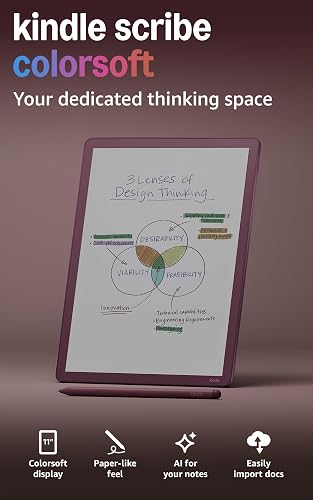 Best for color notes and sketching
Amazon Kindle Scribe Colorsoft 64GB

Kindle Scribe vs Kindle Paperwhite at a glance
The Scribe is the bigger, pen-ready device; the Paperwhite is the compact, waterproof reader. Size and pen support decide more than raw storage.
| Feature | Kindle Scribe Colorsoft | Kindle Scribe 32GB | Kindle Paperwhite |
|---|---|---|---|
| Display | 11 in color | 11 in glare-free | 7 in glare-free |
| Pen | Included | Included | None |
| Storage | 64GB | 32GB | 16GB |
| Waterproof | Not listed | Not listed | Waterproof |
| Best job | Color notes and sketching | Distraction-free note taking | Everyday reading |
The Scribe models share an 11-inch screen, a pen in the box and a 400g body that is 5.4mm thin. The Paperwhite fits a 7-inch screen into an ultra-thin frame you can hold in one hand.
That size gap drives every other difference below. A bigger screen helps notes and documents; a smaller one helps travel.
The table also shows how the Scribe line splits in two. Both Scribes give you the same pen and the same 11-inch canvas, but only the Colorsoft model brings color.
The Paperwhite sits apart from both as the only model here with a waterproof body and no pen at all. Read the table by row: pen and display set the device's job, while storage and waterproofing narrow it down.
Which screen suits your reading?
The Paperwhite is the easier screen to read on in bed or on a train; the Scribe is the better screen for pages with margin notes. Screen size changes how much text you see and how you hold the device.
The Paperwhite's 7-inch display has a higher contrast ratio than earlier Paperwhites and turns pages 25% faster. Amazon says it is the fastest Paperwhite yet.
Text stays sharp, and you can shift the light from white to amber for night reading.
The Scribe's 11-inch display gives you a page closer to a sheet of paper. That matters when you read a PDF or a textbook and want to write between the lines.
The Colorsoft version adds color to books and notebooks.
A larger screen is not free. An 11-inch tablet is awkward to hold in one hand for a long session.
The Paperwhite's smaller frame is the one you can read while standing on a platform. The Scribe's extra inches also buy space for the writing layer, which is why the display size sits at the center of this comparison.
On a 7-inch screen a margin note would crowd the text; on an 11-inch page there is room for both.
Reading in bright light and at night
Both lines are front-lit and glare-free. The Scribe's display adapts brightness to the room and lets you adjust warmth at night.
The Paperwhite offers the same white-to-amber range.
The Scribe also states its display stays easy on the eyes in bright sunlight. That is a maker claim about the screen, not a test result.
Still, the glare-free design is the reason both lines read like paper rather than glass. The Scribe's paper-like texture matters most when you write on it, but it also shapes how the page feels when you read.
Neither display flashes the way a color tablet can, and the Scribe states that its color layer avoids distracting flashes while you write.
Which one should you buy for writing and notes?
The Scribe wins for writing, hands down. It ships with a pen that never needs charging and has a built-in eraser and shortcut button.
The Paperwhite has no pen and no notebook app.
The pen-on-paper feel comes from a textured surface and a responsive display. You can take notes in the built-in notebook, then use AI tools to find information in your notes, ask questions about what you wrote and generate summaries.
Handwriting cleanup and text conversion are part of the same toolset. The shortcut button maps to tools such as the highlighter, so you can switch without leaving the page.
Document review is the other strength. You can import files from Google Drive or Microsoft OneDrive, add handwritten notes and markups, then export them as PDFs.
Notebooks can also go to Microsoft OneNote for editing anywhere.
Reading and writing connect here. You can pick a title from the Kindle Store and jot notes right on the page.
Text shifts to make room when you write between the lines, and margins expand or collapse as needed.
Color or monochrome?
The Colorsoft Scribe adds a color layer to notebooks and books. Its display is built for high-contrast, paper-like color without distracting flashes while you write.
That is the difference between the 9.7 score and the 8.4 score.
If you sketch, color-code notes or read illustrated books, the Colorsoft earns its place. If you write plain text notes and read novels, the monochrome Scribe does the same core job.
Our comparison of the Kindle Paperwhite vs Signature Edition shows how Amazon splits its reader line in a similar way.
How the pen changes a reading session
On a Paperwhite, reading is one way. You read a page, turn it, and move on.
A Scribe lets you stop and write. You can underline a line of text by hand, sketch a diagram in the margin or leave a question next to a paragraph.
Those marks stay with the document. Imported files come in from Google Drive or OneDrive, and your handwritten notes and markups export as PDFs when you are done.
The pen's eraser means corrections are quick, and the shortcut button reaches the highlighter without hunting through menus.
This is the real gap between the two lines. The Paperwhite asks you to read and remember.
The Scribe asks you to read and respond. If your reading usually starts a note, the Scribe is built for you.
How do they compare for travel and daily carry?
The Paperwhite is the travel pick; the Scribe is the desk and bag pick. Weight and size decide this, not features.
The Paperwhite is ultra-thin with a larger glare-free screen than its predecessor. It slips into a jacket pocket or a small bag.
The Scribe is 5.4mm thin and 400g light for an 11-inch device, which is impressive at its size but still a two-hand object.
Water resistance widens the gap. The Paperwhite is waterproof, so it can go by the pool or in the bath.
Amazon does not list waterproofing for either Scribe model, so keep a Scribe away from water. That one line settles the bath and beach case in the Paperwhite's favor.
Battery life favors both lines over a tablet. The Paperwhite runs up to 12 weeks on a charge via USB-C.
The Scribe promises weeks of reading and writing per charge. Neither number replaces your own habits, but both mean you can leave the charger at home on a short trip.
Note that a Scribe's "weeks" covers writing as well as reading, while the Paperwhite's 12-week figure is a reading estimate. Heavy note taking and the Scribe's color screen both draw on the same charge.
Distraction-free by design
Both lines are purpose-built for reading and writing. Neither has social media, notifications or the distracting apps of a tablet.
The Scribe states this directly for its writing use, and the Paperwhite states it for reading.
If focus is the reason you want an e-reader, both deliver. The Scribe adds a pen and a bigger canvas to that focus.
The bigger screen can cut both ways. It gives you room for notes, but it also takes more bag space and asks for two hands.
A reader who only wants pages is better served by the device that disappears into a pocket.
Which storage size do you need?
The Paperwhite's 16GB suits a reading library; the Scribe models give you more room for notes, documents and color files. Storage matters more once you add PDFs and handwritten pages.
The Scribe Colorsoft carries 64GB. The monochrome Scribe carries 32GB.
The Paperwhite carries 16GB. For text-only novels, 16GB goes a long way.
For imported documents and notebooks, the extra room on a Scribe helps. Notes, imported files and color content all add up in a way that plain text books do not.
The Kindle Store lists over 15 million titles, and a Kindle Unlimited subscription adds all-you-can-read access to a catalog that includes best sellers. A large library is easy to build.
Our guide to how many books a Kindle can hold breaks down how file size affects the count.
If you switch devices, your Kindle books follow your Amazon account. Our walkthrough on how to transfer books to Kindle covers both store purchases and files you send yourself.
The storage choice is less about how many novels you own and more about whether documents and notebooks share the device. A reader who only loads books can live happily on 16GB.
A note taker who imports work files and keeps years of notebooks will feel the difference between 32GB and 64GB over time.
Who should buy the Kindle Scribe?
Buy the Scribe if you take notes, mark up documents or sketch and want one device for reading and writing. The pen is included, the screen is large and the AI tools turn notes into something you can search and summarize.
The Colorsoft model is the best Scribe for most note takers. Color makes notebooks easier to read and gives illustrated books more depth.
It also earns the top score in this comparison at 9.7.
The monochrome Scribe 32GB is the value pick inside the Scribe line. It keeps the 11-inch display, the included pen and the faster writing and page turns.
Choose it if color would be a nice extra rather than a reason to buy. It also states 40% faster writing and page turns than earlier Scribes, so speed is not the reason to spend more.
Skip the Scribe if you mainly read novels on the move. Its size and weight make it a poor fit for a commute or a bath, and the Paperwhite costs less for that job.
The pen only pays off if you actually write. A Scribe bought for reading alone asks you to carry a bigger device and skip the water resistance for features you never touch.
Who should buy the Kindle Paperwhite?
Buy the Paperwhite if reading is your main use and you want a light, waterproof device you can carry anywhere. It is the best reader for most people who do not need a pen.
The 7-inch display, faster page turns and waterproof body cover the daily reading case well. The amber light and 12-week battery make long sessions and long trips easier.
It also holds 15 million titles within reach through the Kindle Store.
Skip the Paperwhite if you want to write, sketch or mark up documents. It cannot do those jobs.
If you also want a tablet for video and apps, our Kindle Paperwhite vs Kindle Fire comparison explains where a Fire tablet fits instead. The Paperwhite's own pitch is escape from apps and notifications, so it is the right Kindle only when reading is the whole point.
Which Kindle wins the comparison?
The Kindle Scribe Colorsoft wins overall for most readers who want both reading and writing, but the Paperwhite is the better buy for reading alone. The kindle scribe vs kindle paperwhite choice comes down to whether the pen and the larger screen are worth the size and cost.
Pick the Scribe Colorsoft 64GB if you keep notebooks, read documents and want color on the page. Pick the monochrome Scribe 32GB if you want the same pen experience and can live without color.
Pick the Paperwhite 16GB if you read on the go, read in the bath or want the lightest device.
One last check before you decide: hold a tablet the size of an 11-inch screen for a few minutes and imagine reading a chapter. If that feels heavy, the Paperwhite is your Kindle.
If it feels like room to think, buy the Scribe.
Frequently asked questions
Is the Kindle Scribe better than the Kindle Paperwhite?
The Kindle Scribe is better if you take notes, mark up documents or sketch, because it includes a pen and an 11-inch display. The Kindle Paperwhite is better for plain reading and travel, since it is smaller, waterproof and easier to hold with one hand.
Can the Kindle Paperwhite write like a Scribe?
No. The Paperwhite has no pen support and no built-in notebook, so it is a reading device only.
If writing matters to you, choose a Scribe model.
Is the Kindle Scribe waterproof?
Amazon does not list waterproofing for either Scribe model. The Kindle Paperwhite is waterproof, so it is the safer pick for the bath or pool.
For a Scribe, keep it away from water.
Do I need the color Scribe or the regular Scribe?
Choose the Kindle Scribe Colorsoft if color in notebooks and books matters to you. Choose the monochrome Scribe if you mostly write in black and want the same 11-inch pen experience.
The Colorsoft model scores higher here.
How many books fit on each Kindle?
The Scribe Colorsoft holds 64GB, the monochrome Scribe holds 32GB and the Paperwhite holds 16GB. Real book counts depend on file sizes.
Our guide to how many books a Kindle can hold explains the math.
Can I move my books between Kindles?
Yes. Kindle books stay tied to your Amazon account, so they appear on a new device once you sign in.
Our guide on how to transfer books to Kindle covers the steps for downloaded files.